Sentinel as Code Toolkit
The VS Code extension that used to be SentinelCodeGuard shipped its biggest release: coverage of every Sentinel content type, first-class Defender XDR authoring, and a connector catalogue rebuilt from Microsoft's own source data.


The Visual Studio Code (VS Code) extension that used to be called SentinelCodeGuard shipped its largest release happened on Friday (10 July 2026), and this release is a big one. Under the new Sentinel as Code Toolkit label the extension has stopped being an analytics-rule designer and has become a full Sentinel-as-code authoring extension for Microsoft Sentinel and Microsoft Defender CustomDetections. It also brings its own version scheme into line with the Sentinel-As-Code repository it pairs with, and rebuilds its connector catalogue from Microsoft's own source data.
If you were running the previous v0.1.0 build against a Sentinel-As-Code repository, this release is where the editor catches up with what the repository can hold. If you were not running the extension, this release is worth a fresh look for two reasons: the scope has widened enough that "analytics-rule helper" is no longer an accurate description, and the connector table underneath every autocomplete and validation call has almost doubled in size.
The rename, the version, and what stays the same
The repository moved from noodlemctwoodle/SentinelCodeGuard to noodlemctwoodle/Sentinel-As-Code-Toolkit. GitHub is redirecting the old address, so any existing bookmark or continuous integration (CI) reference keeps working without change. The Marketplace publisher identifier is deliberately unchanged (noodlemctwoodle.sentinelcodeguard), so the existing installs upgrade in place without any manual re-install; you will just wake up on a version numbered 26.7.2 (human-facing 26.07-2) instead of 0.1.0, and the "Beta" tail on the display name is gone.
That version jump is not a version bump. It is the extension adopting the same Calendar Versioning (CalVer) scheme, YY.0M, that Sentinel-As-Code moved to recently. The two projects now sit under one release cadence, and a reader looking at "26.07" on either project knows immediately when that release shipped. The minimum VS Code version bumps to 1.125.
One practical note on timing: the release just committed, and the Marketplace listing rolls forward once the CI workflow publishes the Visual Studio Extension (VSIX) package. If your editor has not offered the update by the time you read this, the listing has not caught up yet; give it a day.
IntelliSense
The single change that most changes the day-to-day feel of writing detections in this Toolkit is what happens when you type. This is not generic YAML IntelliSense with a schema bolted on; the editor understands the specific field vocabulary the pipeline accepts and offers only that.
Type tactics: and the MITRE ATT&CK tactic list appears. Type connectorId: and the full Content Hub catalogue drops down — 631 entries, each with its description and category — so you pick a real connector by name rather than paste an identifier you half-remember. Hover on any field for inline documentation. The completions are aware of where the file lives: an analytics rule in Content/AnalyticalRules/ and a hunting query in Content/HuntingQueries/ get different suggestions because they are different content types with different schemas.
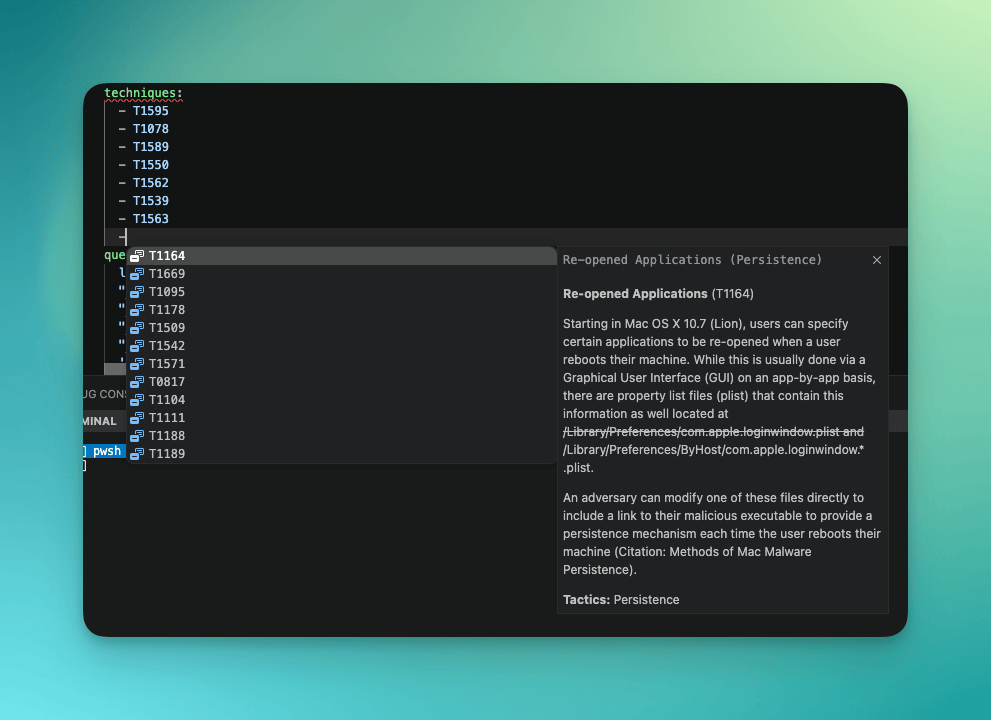
That folder-awareness is the piece that removes the setup step. Schemas bind to folders via paths declared inside the extension manifest, so opening a Sentinel-As-Code repository is all the configuration there is. No per-workspace settings.json, no JSON schema declarations, no per-file setup: the folder is the configuration. For anyone who has spent an afternoon wiring schemas into VS Code by hand, that alone is worth the update. Reference: Schemas and Validation.
Multi-content authoring is the headline
The previous extension was, honestly, an analytics-rule tool with a few adjacent conveniences. v26.7.1 replaces that scope. Every content type the Sentinel-As-Code repository can hold has first-class support in the editor now:
- Analytics rules
- Hunting queries
- Parsers
- Summary rules
- Automation rules
- Watchlists
- Workbooks
- Playbooks
- Defender XDR custom detections
Many new content types, each with its own file shape, its own field order, and its own schema. The extension carries seven bundled JSON schemas so every open file in a Sentinel-As-Code repo picks up the correct validator without any workspace configuration.
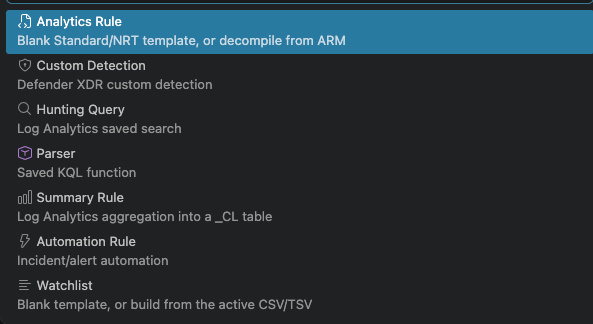
The toolbox
Everything the Toolkit offers is reachable from the VS Code Command Palette (⇧⌘P on macOS, Ctrl+Shift+P on Windows and Linux) under two prefixes: Sentinel-As-Code: for Sentinel content and Defender-As-Code: for Defender XDR custom detections. Grouped by what they save you from doing by hand, the commands break into five types. The full reference for every command lives in the Toolkit docs: Commands.
Create
New content should not start from a blank file and a memory of last month's rule. The Toolkit ships templates for every content type, each with commented fields and correct default shape.
- New Sentinel-as-Code Content.. is the umbrella scaffolder: it asks what you are creating and drops the right template in the right folder.
- New Hunting Query, New Automation Rule, New Parser, and New Summary Rule are direct shortcuts for the most common types.
- Generate Rule Template produces a fully populated analytics-rule skeleton with every field commented, useful when you want the maximum starting point rather than the minimum.
- Defender-As-Code: Generate Custom Detection Template does the same for Defender XDR custom detections.
The template is not just a shape; it is a schema-aligned document, so the IntelliSense described above kicks in from the first keystroke. Reference: Templates.
Format
A repository whose rules are shaped inconsistently produces noisy diffs and hides real changes in field-order churn. The Toolkit removes that class of change entirely.
- Format Sentinel Content (Auto-detect) is the one to bind to a keystroke. Point it at any file; it works out the content type from the folder path and top-level shape, and applies the right formatter — YAML field ordering for analytics rules, hunting queries, and parsers; stable-key JSON for automation rules, summary rules, watchlists, workbooks, and playbooks.
- Format Sentinel Rule is the same operation targeted specifically at analytics rules.
- Fix Field Order re-orders YAML fields into the canonical sequence without otherwise touching the file, if that is all you need.
Every diff after this becomes a real change. That is worth more than it sounds when you are reviewing multiple pull requests.
Validate
The pipeline will catch a broken rule. It will do so 90 seconds after you push. The Toolkit catches it while you are still looking at the file.
- Validate Rule (Auto-detect Type) checks the file against the right schema for its location and content.
- Validate as Sentinel Analytics Rule forces the analytics-rule schema, useful when auto-detect would guess otherwise.
- Defender-As-Code: Validate as Custom Detection is the equivalent for Defender XDR custom detections, and applies the schema that models the fiddly parts of the
detectionRulesurface that used to fail silently in production. - Bulk Maintenance & Validation sweeps the entire repository in one pass: every content type, every file, every schema. This is the command to run before opening a pull request that touches more than a couple of files, or after pulling a large upstream change.
Validation errors show up in the standard VS Code Problems panel, so they behave like the rest of your linting.
Convert
Some content types live in the repository in a different shape from how you want to author them, and one command in this family makes an entire class of legacy migration trivial.
- Convert Content YAML to JSON takes a YAML file you have been authoring — with inline comments, sensible field order — and produces the JSON on-disk shape the deployment pipeline consumes, for automation rules, summary rules, and watchlists. The YAML stays alongside as your source of truth; the JSON is a build artefact.
- Defender-As-Code: Convert Custom Detection YAML to JSON and Defender-As-Code: Convert Custom Detection JSON to YAML round-trip Defender detections between the repository authoring format (YAML) and the deployable Microsoft Graph
detectionRuleJSON. Portal export in, clean YAML out; validated YAML in, deployable JSON out. - Decompile ARM to YAML is the one worth knowing about even if you never intend to use the rest of the extension. Point it at an Azure Resource Manager (ARM) template and the Toolkit will pull the rule definitions out and produce clean, schema-aligned YAML for each. If you have a Sentinel workspace that was ever stood up with ARM templates and you have been putting off moving those rules into a Sentinel-As-Code repository, this is the one command that makes it a Monday-morning job rather than a project.
Housekeep
Three commands handle the small, repetitive tasks that everyone forgets and that break rules silently when they are wrong.
- Populate Required Data Connectors from Query is the standout, and it earns its own section below. In one keystroke, it fixes the
requiredDataConnectorsfield that most community-contributed rules get wrong. - Generate New Rule ID produces a fresh GUID and inserts it into the current file. Copying a rule as a starting point? This is how you avoid two rules sharing the same
id, which the pipeline will not tell you about until deployment. - Generate New IDs for All Rules does the same across an entire folder. This is the command you run once, right after forking a public rule pack into your own repository, to give every rule a fresh identity of its own.
YAML on the way in, JSON on the way out
One detail worth calling out because it is not obvious from the outside. Three of the nine content types — summary rules, automation rules, and watchlists — are stored as JSON on disk because that is what the pipeline reads currently (subject to change very soon). Writing raw JSON with no inline comments and no schema hinting is genuinely unpleasant, so the Toolkit lets you author them as YAML (with the comments the templates ship with) and convert to the JSON on-disk shape with one command: Convert Content YAML to JSON. The YAML is the authoring surface; the JSON is the deployment artefact; the schema validates the JSON; the template gives you the YAML. It is the piece that makes the "as code" story work for the content types that were never designed with authoring in mind. Reference: Templates.

The requiredDataConnectors problem, solved in one command
A small feature worth pulling out of the list because it fixes a category of authoring error that has quietly followed detection-as-code around for years. Every analytics rule references Kusto Query Language (KQL) tables in its query field, and is supposed to declare the connectors that produce those tables under requiredDataConnectors, in canonical shape, with the correct connector identifiers. In practice most people look it up every time, guess, or leave it empty.
I am also guilty of this!
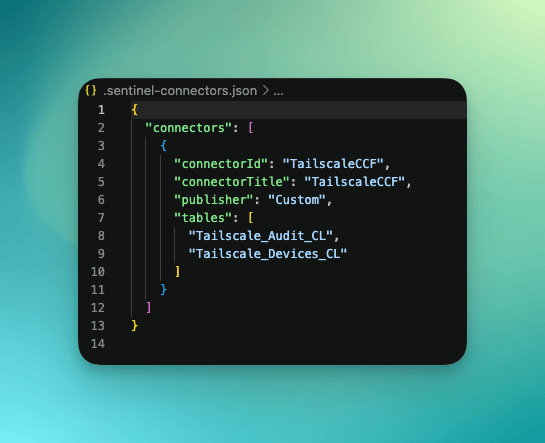
The Toolkit closes the gap with a command: Populate Required Data Connectors from Query. It reads the KQL tables in the rule, resolves each one against the bundled 631-connector / 744-table Content Hub reverse index, and writes the field in canonical order. Where a table maps to more than one connector it prompts; where it maps to none — a custom _CL table from your workspace — it offers to register it. Choose Add and the entry lands in .sentinel-connectors.json at the repository root, a workspace-level connector registry the Toolkit reads on every subsequent run. The file is created the first time you use it; you never hand-write it. No tenant call, no network round-trip, no chance of a nearly-right connector identifier making it into the repo. Reference: Configuration.
Tell the validator what to ignore: a community feature
This one is worth calling out because it came from the community. GitHub user @jgaukel filed the request as issue #44 back in October 2025 a well-scoped ask for exactly the setting that shipped. The setting name changed slightly on the way in (the original request used sentinelRules.…, the shipped version uses sentinelAsCode.… to align with the rest of the extension's namespace), but the shape and intent are the same. Nine months from issue to release. Sorry it took so long. If you have been running the extension against a repo where the Problems panel became untrustworthy, this is the setting that gets it back. Full reference: Configuration.
Real repositories accumulate exactly the sort of files a validator will trip over honestly and pointlessly: test fixtures with deliberately-broken YAML, draft rules mid-edit, archived rule packs kept for reference, template files full of placeholder values. Before this release, the extension flagged every one of them and the Problems panel filled with noise. Enough noise, and people stop reading the panel, which is the worst possible outcome for a validator to produce.
The fix that shipped in v26.7.1 is a new setting, sentinelAsCode.validation.excludePatterns, which takes an array of patterns for files the extension should leave alone. The matcher supports *, **, ?, and {a,b} alternation, and matches against the workspace-relative path, the absolute path, and the basename. Excluded files clear their diagnostics and produce none afterwards. The default is an empty array, so nothing changes unless you opt in.
In practice it lives in your repository's .vscode/settings.json and looks like this:
{
  "sentinelAsCode.validation.excludePatterns": [
    "**/*.draft.yaml",
    "**/*.draft.yml",
    "tests/fixtures/**",
    "Content/Archive/**",
    "**/_scratch/**",
    "**/{example,template,placeholder}-*.yaml"
  ]
}
Reading down the list: draft files anywhere in the tree by suffix, everything under tests/fixtures/, an entire Content/Archive/ tree of retired rules, any personal scratch folder called _scratch wherever it sits, and anything whose basename starts with example-, template-, or placeholder- using the {a,b,c} alternation the matcher supports. Six lines, and the Problems panel goes back to showing only the things you can actually fix.
Defender XDR: first-class, deliberately pipeline-scoped
Defender XDR custom detections are the second big addition, and the design decision worth reading closely is what the extension does not do.
The previous extension shipped with a Microsoft Authentication Library (MSAL) auth provider so that some operations could reach into a tenant directly. That auth provider has been removed. There is no OAuth flow, no tenant selection, no direct-deploy path. Everything Defender XDR-related in this release flows through the same continuous integration / continuous deployment (CI/CD) pipeline as the rest of a Sentinel-As-Code repository: you author locally, commit, and the pipeline deploys.
Within that shape, the tooling is generous. Four commands, all under the Defender-As-Code: prefix, cover the end-to-end workflow: Generate Custom Detection Template starts a new detection from a schema-aligned template; Validate as Custom Detection checks the file against the authoring schema; and the pair Convert Custom Detection YAML to JSON and Convert Custom Detection JSON to YAML round-trips detections between the repository authoring format and the deployable Microsoft Graph detectionRule JSON. In practice this means a portal JSON export from security.microsoft.com becomes clean, repository-ready YAML in one command, with the runtime and read-only fields the portal adds (server-assigned IDs, last-run metadata, status flags) stripped automatically. Full reference: Defender Workflows.
The schema underneath models the fiddly parts of Defender XDR's detectionRule surface that used to fail silently: the full range of responseActions action types, the isolationType for device isolation actions, device-group scoping via the portal export's deviceGroupNames field (the Graph API models the same idea as organizationalScope.scopeNames), and the impactedAssets block across device, user, and mailbox targets. If you have ever hand-edited a Defender custom detection and had a run mysteriously do nothing, one of those fields was probably wrong; the validator now catches it before the commit lands.
The Graph API migration deadline: 1 October 2026
Attached to the Defender XDR support is a real dated migration. The detectionRule API is a beta-tier Microsoft Graph endpoint (as Microsoft's own docs put it: APIs under the /beta version in Microsoft Graph are subject to change), and the beta reference explicitly deprecates two fields on the Defender custom-detection resources with a removal date of 1 October 2026:
responseActionsbecomesautomatedActionsisEnabled(boolean) becomesstatus(enum)
Both are documented on the face of the detectionRule beta API reference with the same 2026-10-01 wording. The extension's own migration guide additionally flags a third planned change, impactedAssets becoming entityMappings, which had not appeared as a deprecation notice in the published Microsoft Graph beta reference at the time of writing; treat that one as a signal from the extension's authors about where the schema is heading, rather than as a Microsoft-published deadline. Full detail: Graph API Migrations.
The first date is twelve weeks from today. Today's release supports the current API surface, and dual-read support (so a repository can hold detections in either shape during the crossover) is the stated near-term priority. If you are authoring Defender detections in code, the two confirmed renames are the ones to plan around: anything committed against the old names will keep working until 1 October and will need re-generating after that. The third rename is worth tracking in the extension's changelog and against future Microsoft Graph release notes, rather than assuming an API deadline that Microsoft has not yet published.
The connector catalogue
The catalogue behind every autocomplete and validation call in the Toolkit has been rebuilt from Microsoft's own source data. Three outcomes matter for anyone authoring rules against it:
- 631 connectors, up from 342. 495 of them resolve to a mapped set of 744 real Log Analytics table names. If a connector exists in Content Hub, the picker knows about it.
- No more placeholder table names. Modern Codeless Connector Framework (CCF) connectors used to appear in the picker as
{{graphQueriesTableName}}and similar unresolved template values. They now show their real table names, so what you pick is what the rule queries. - No more mis-attribution. A long-standing bug where multi-content solutions over-claimed tables is closed. Office365, as one example, now correctly maps to
OfficeActivityonly, rather than to every table any Office365 solution happens to include.
If you are running your own CCF connectors they can be added to .sentinel-connectors.josn. This will allow you to add custom tables and data connectors to your analytical rules. This file is autogenerated when it can't find a table in the schema.
Two small ergonomic wins land alongside it. The dataTypes: picker in analytics rules now opens the table picker directly when you press - , one keystroke earlier than before. And the catalogue refreshes itself weekly from the upstream source, so the extension will not drift from Microsoft's canonical list between releases.
Licence: Apache-2.0, not open to contributions
The commit that ships v26.7.1 places the Toolkit under the Apache-2.0 licence, with a NOTICE file recording the project copyright. Both the Toolkit and its companion Sentinel-As-Code repository now sit under the same licence. If your organisation evaluates open-source projects against a policy that prefers a named patent grant (many corporate policies do), Apache-2.0 is a smoother fit than the MIT licence the Toolkit's earlier 0.1.0 line carried.
One clarification worth making because the licence choice invites the wrong inference. Apache-2.0 governs how you may use and redistribute the extension; it does not make this a community-development project. There is no CONTRIBUTING.md, GitHub Issues is disabled on the Toolkit repository (feedback and feature requests go to the Sentinel-As-Code issue tracker), and pull requests are not accepted against the Toolkit itself. The extension is source-visible, permissively licensed, and closed to outside contribution. If you have a feature request or a bug report, the issue tracker is the front door.
Upgrading
If you already have the extension installed, the Marketplace identifier is preserved: your update will pick up "Sentinel as Code Toolkit" v26.7.2 as a routine upgrade, with no side action required. If you see the new name appear in your extensions list where "SentinelCodeGuard (Beta)" used to sit, that is the same tool, renamed.
If you are installing it fresh, open the Sentinel as Code Toolkit listing on the Visual Studio Marketplace, or search VS Code's Marketplace for "Sentinel as Code Toolkit" and pick the entry by TobyG. VS Code 1.125 or newer is the minimum. Point it at a Sentinel-As-Code repository (or any folder of Sentinel content) and every YAML and JSON file inside gets validation and autocomplete without any further configuration.
If you have never worked in a Sentinel-As-Code repository at all, the project itself lives at github.com/noodlemctwoodle/Sentinel-As-Code; the extension is easiest to appreciate against a repo it was designed to author into, and the two are now on the same version cadence for a reason.
Support the work
Both the Toolkit and the Sentinel-As-Code project it pairs with are built and maintained in personal time, alongside a day job. There is no advertising in the extension, no telemetry that only unlocks in a paid tier, and no gated features: everything described above is what you get on the free install. If it has made your working life easier and you would like to help keep it going, there are two straightforward ways.
Sponsor the projects on GitHub. The Sentinel-As-Code and Sentinel-As-Code-Toolkit repositories both accept GitHub Sponsors contributions, from one-off amounts to monthly. Any amount goes directly into the hours that keep releases like this one shipping.
Support sentinel.blog directly. The blog itself runs on reader subscriptions — individual tiers for practitioners who want to underwrite the writing, and organisation tiers for teams whose employer wants to sponsor the work formally. Very few things on the blog is a paywalled: everything stays free to read regardless of tier. A subscription just funds the time behind the posts that document each release.
Either helps. Both together carry the projects a long way.
The extension is at github.com/noodlemctwoodle/Sentinel-As-Code-Toolkit and on the Visual Studio Marketplace as noodlemctwoodle.sentinelcodeguard.
Today's release is v26.7.2 Documentation for the Toolkit lives with the companion project at github.com/noodlemctwoodle/Sentinel-As-Code/tree/main/Docs/Toolkit.

If you've enjoyed this content and would like to support more like it, please consider subscribing. Your support helps me continue creating practical security automation content for the community.