Sentinel-As-Code 26.07: From Markdown to the Boardroom
Sentinel-As-Code 26.07 renders the Documenter's daily Markdown inventory into a styled Word (.docx) report: numbered table of contents, colour-coded severity tables, and 42 gap-analysis rules across MITRE ATT&CK, cost, and hygiene. Here's what's in it, and what the same day's other pushes mean.

Most of what a Microsoft Sentinel workspace produces is code. Analytical rules in YAML, playbook logic in JSON, hunting queries in Kusto Query Language (KQL), Bicep for the workspace itself. It is the right shape when you are running detections. It is an awkward shape when someone needs a document.
Sentinel-As-Code shipped v26.07 today (7 July 2026), and the headline change closes that gap in a specific way. Since the Documenter first landed in early June, the project has been running a read-only sweep of a live workspace on a daily schedule and producing 37 Markdown sections, 25 Mermaid diagrams, 42 gap-analysis findings, a cost estimate, and MITRE ATT&CK v18 coverage tables. Everything a practitioner would want to see, laid out in text.
v26.07 adds a second output on top of that same pipeline: a styled Word (.docx) report. Same data, same daily source. Numbered table of contents, colour-coded severity tables, and the house style baked into a Pandoc reference document. One Azure DevOps (ADO) pipeline run, one artefact.
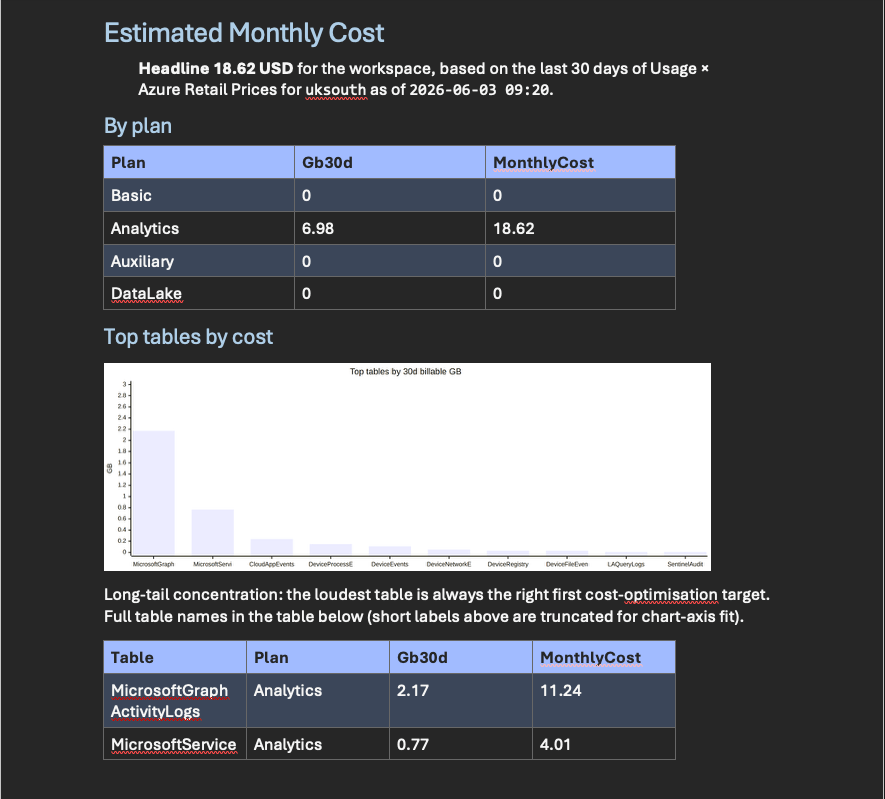
What is in the report
The daily Documenter run captures around thirty-five read-only pieces of workspace state through a collector script called Export-SentinelInventory.ps1: Sentinel artefacts, data collection rules and endpoints (DCRs and DCEs), diagnostic settings, Data Lake configuration, subscription context, resource locks, Azure Policy assignments, and a rolling thirty-day slice of the Usage table for cost. The collector runs on an OpenID Connect (OIDC) service principal scoped to Microsoft Sentinel Reader and Log Analytics Reader only. Runtime sits at around five minutes.
The renderer takes that JSON and produces:
- 37 Markdown sections covering workspace configuration, connectors, rules, hunting, playbooks, watchlists, workbooks, and cost.
- 25 Mermaid diagrams, pre-rendered to PNG through
mmdc@10so downstream renderers do not need a live Mermaid runtime. - 42 gap-analysis rules (
SENT-001throughSENT-049, non-contiguous), grouped into Operational, Hygiene, Identity, Resilience, and Cost. Real, dated gaps: for example, the Custom Logs v1 (CLv1) HTTP API deprecation on 14 September 2026; the Microsoft Monitoring Agent (MMA) end of support on 31 August 2024; the legacy Threat Intelligence table retirement on 31 July 2025. If your workspace still has legacy paths in it, the Gap Engine will name them. - A cost estimate built from the Azure Retail Prices API. Pay-as-you-go Sentinel is modelled honestly as two stacked per-GB charges: Log Analytics ingestion, and the Sentinel premium layered on top. Microsoft has renamed the underlying meters more than once (the current pay-as-you-go ingestion meter is
Pay-as-you-go Data Ingestion; legacy names still surface for older workspaces), socost-meters.jsoncarries multiple identifier candidates per category, and the tool tries each in turn against the Retail Prices API response. That keeps the estimate non-zero regardless of which name the API returns for a given stock-keeping unit (SKU). Basic Logs, Auxiliary Logs, Data Lake ingestion, retention, and long-term archive are separate categories in the same map. - MITRE ATT&CK v18 coverage across 14 tactics and 691 technique entries (the v18 snapshot the tool was built against; the live matrix at attack.mitre.org has since gained a tactic in a later release), with every technique ID linked back to
attack.mitre.orgso a reader can jump from a rule to the source. - A privacy guard that refuses to upload the resulting artefacts to a public repository. Sensible default.
That is a large, opinionated document. What v26.07 changes is that all of it now renders into a .docx with a numbered table of contents, page numbers, and severity tables coloured to match a house style, instead of a folder of Markdown a stakeholder has to squint at.
How the Word pipeline works
The Word export lives at Tools/Documenter/Report/, introduced in pull request #29. Five files carry it:
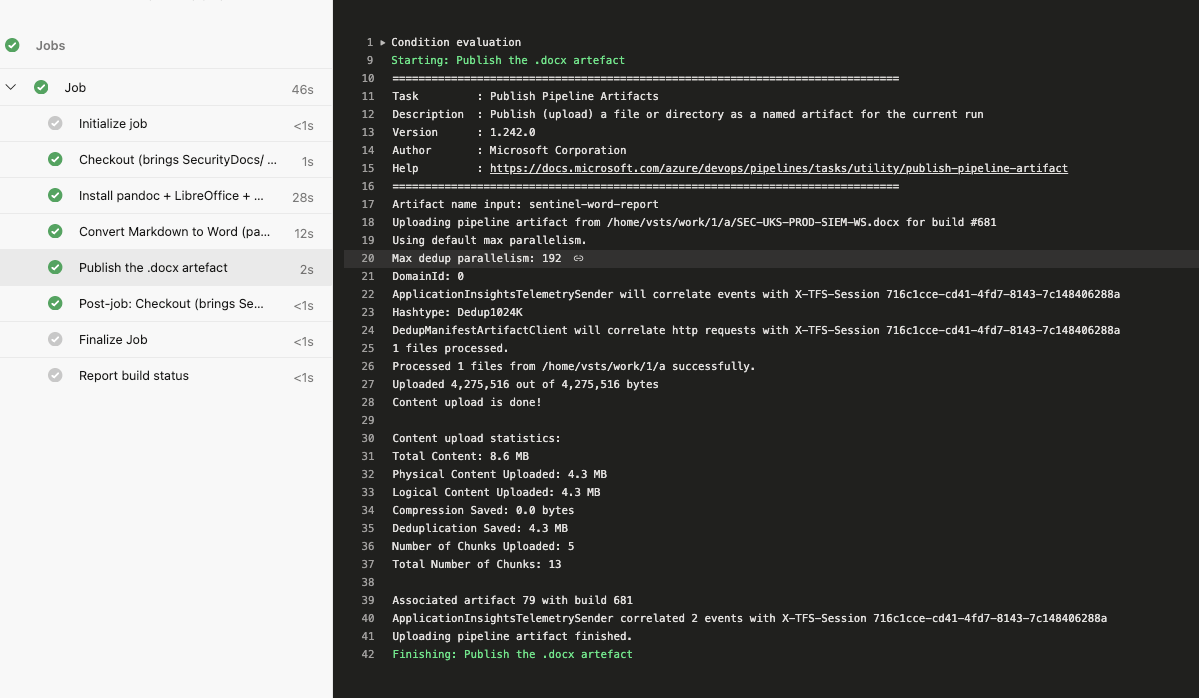
Convert-MarkdownToWord.ps1: the main converter. Takes the Documenter's Markdown output, applies the house style through a Pandoc reference document, and produces a.docxwith colour-coded severity tables and a page-numbered table of contents.Convert-FolderToWordReport.ps1: a generic folder-to-Word converter with no Azure dependency, so you can point it at any folder of Markdown and get the same styling. Useful on its own, outside Sentinel.Update-WordToc.py: a headless LibreOffice helper that walks the document and populates table of contents field entries plus page numbers. This is the awkward bit of the pipeline, because generating a.docxwith a working table of contents is not something Pandoc alone can do end-to-end.templates/sentinel-report-reference.docx: the Pandoc reference document. Every heading level, table style, and severity colour is baked in here.Pipelines/Sentinel-Word-Report.yml: a manual Azure DevOps pipeline that installs pandoc, LibreOffice (headless), andpython3-uno, then publishes the.docxas an artefact.
The pipeline supports three table of contents strategies: baked, field, and styled. That is not gold-plating. Continuous integration (CI) runners vary in how much of LibreOffice they can host, and the three strategies exist so the pipeline still produces a usable table of contents in constrained environments. The baked strategy is the richest; styled is the fallback when the runner cannot run enough of LibreOffice to update fields.
The new infrastructure dependencies (pandoc, LibreOffice headless, python3-uno) are recorded in Docs/Development/PowerShell-Module-Requirements.md. Any fork that wants to build the Word output will need them on the pipeline agent.
No schema changes to the Content/ directory. The Pester assertion suite that gates the repository (6,304 assertions, all green in this release) is unaffected; the Word pipeline sits alongside the existing content types, not inside them.
The other push: layout and versioning
The Word release did not ship alone. The project's directory layout was reorganised (that is the breaking change), and the versioning scheme moved from a "Wave N" naming to monthly Calendar Versioning (YY.0M). Details are in pull request #27.
The new layout is sensible and a good recommendation from JacopoDT on GitHub. Content types (analytical rules, automation rules, Defender custom detections, hunting queries, parsers, playbooks, summary rules, watchlists, workbooks) all live under Content/. Bicep stacks live under Infra/. Deploy scripts and sentinel-deployment.config live under Deploy/. CI, maintenance, and reporting tools (including the Documenter, and now the Word pipeline) live under Tools/. Pipelines live under Pipelines/. Nine content types, five top-level directories, one clear rule for where a new file belongs.
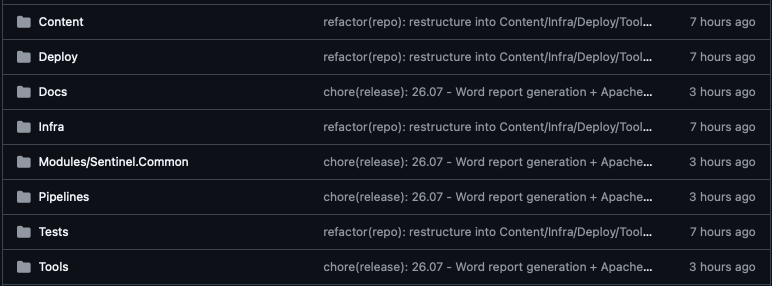
Git history is preserved throughout: everything moved through git mv, so git log --follow continues to work on individual files. Seven GitHub Actions workflows and six Azure DevOps pipelines had their paths updated. The full Pester suite ran green: 6,304 assertions, zero failures.
None of this changes how detections behave. It is layout and versioning only. But it is still a breaking change for anyone maintaining a fork or a downstream pipeline that references the old paths, and the repository currently has thirty-three forks that fall into that bucket.
Fork maintainers are catered for. There is a migration guide at Docs/Migration/26.06-Layout-Restructure.md, and an idempotent helper at Tools/Migrate-ForkLayout.ps1 that supports -WhatIf, so you can run it dry, read the plan, and only apply it once you are happy with the moves. The CalVer history (which "Wave" maps to which YY.0M release) is captured in Docs/Releases/Versioning.md, so old references to Wave 3 still resolve to a real version.
Also in the same commit set: GitHub Actions were bumped to their Node 24 compatible versions (checkout@v5, cache@v5, upload-artifact@v6, various Azure actions to v3, peter-evans/*@v8). Node 20 has a forced-removal deadline of 16 September 2026, and this gets ahead of it.
The relicensing: MIT to Apache-2.0
The last change in this release moves the project from the MIT licence to Apache-2.0. Both licences are permissive, and neither imposes copyleft; the material difference is Apache-2.0's explicit patent grant. If your organisation evaluates open-source projects against a policy that prefers a named patent grant (many corporate policies do), Apache-2.0 is a smoother fit than MIT. That is the whole story.
Two practical notes:
- The last MIT release is
26.06.1, and it remains available under MIT. Anyone with an existing dependency does not have to move. - A
NOTICEfile has been added with the project copyright and clean carve-outs for community-contributed rules and Microsoft-published content, so the licensing surface is unambiguous per file.
Small change on the diff. Real signal for enterprise adopters.
What still needs hands
Being honest about the shape of this: the Word report is not fully hands-off. The Documenter runs daily at 06:00 UTC on its own, producing the Markdown, Mermaid, and gap findings without human intervention. The Word pipeline sits on top of that as a manual Azure DevOps trigger. That is a deliberate choice (you do not want a fresh board-ready report firing off automatically the moment a workspace changes), but it is worth being clear about: you kick the Word job when you want the artefact, not whenever the workspace changes.
The pandoc, LibreOffice, and python3-uno dependency chain is also something to sanity-check on your build agents. If your Azure DevOps agents are locked down, the three table of contents strategies exist for a reason: pick the one your agent can actually support and do not fight the environment.
And the Word output, though styled and opinionated, is still a technical document. It is not a slide deck; it is not a two-page executive summary. It is the workspace, all of it, laid out for someone who wants to read a report rather than open a dashboard. That is a specific niche, and it is the one v26.07 fills well.
What to do with this if you already run Sentinel
If you already run the Documenter, the upgrade path is straightforward. The Word pipeline is additive, there are no schema changes to your content, and no changes to the collector's least-privilege service principal. Add the three infrastructure dependencies to your build agent, drop the Sentinel-Word-Report.yml pipeline into your Azure DevOps project, and run it when you need a report.
If you do not yet run the Documenter, this release is a good moment to start. The daily inventory produces its 37 Markdown sections and 42 gap findings before you touch the Word output; even without the .docx, the pipeline is worth having pointed at your workspace so you can see the shape of your own environment. The pull request that introduced the Documenter is a good place to start reading.
If you maintain a fork of Sentinel-As-Code, the migration script (Tools/Migrate-ForkLayout.ps1 -WhatIf) is the first thing to run. Read the plan; then run it for real.
And if you are a security manager who wants a document from your Sentinel team every month, forward this post to the person who owns the workspace and ask them to schedule the pipeline. You will get 37 sections, 42 gap findings, a cost estimate, and MITRE ATT&CK coverage in a single file, and it will look like something you can print.
That is v26.07. Small on the surface, meaningful under it: the point at which the Documenter's daily output stops being an internal artefact and starts being something a room full of non-engineers can hold.
The project lives at github.com/noodlemctwoodle/Sentinel-As-Code. Today's releases are pull request #29 (v26.07 Word report and Apache-2.0 relicensing) and pull request #27 (repository restructure and CalVer adoption).