Sentinel Playbook Manager

One Script to rule them all, One Script to find them, One Script to bring them all, and in the SOC bind them.

If you have ever tried to move a Microsoft Sentinel playbook from one tenant to another or from the portal into a Git repository you will know the pain. The out-of-the-box "Export Template" button gives you something almost useful: a JSON file stuffed with hardcoded subscription IDs, tenant IDs, resource group names, a region buried in every API path, connector names with designer suffixes like azuresentinel-3, and a $connections block that the ARM deployment engine is unhappy with.
For years the answer has been the brilliant Playbook ARM Template Generator by Sreedhar Ande and Itai Yankelevsky, shipped in the official Azure-Sentinel repository. It is genuinely excellent work and it has saved me countless hours over the years if you have ever shared a playbook with a colleague or published one to the community gallery, you have almost certainly used it. Sreedhar's contributions to the Sentinel ecosystem are a big part of why sharing community content is as easy as it is today.
What I wanted was a little different. My use case had drifted from "export one playbook to share it" towards "round-trip hundreds of playbooks through a CI/CD pipeline across multiple environments, on a Mac, inside a GitHub Actions runner." Different workflow, different constraints. Invoke-SentinelPlaybookManager is the result not a replacement for the original, but an adaptation of the same good idea into a different shape.
A Different Workflow
The official generator is designed around an interactive SOC engineer on a Windows machine. It uses System.Windows.Forms dialogs and Out-GridView pickers for tenant, subscription, and playbook selection, and it walks you through one playbook at a time. For the use case it was built for a single engineer exporting a single playbook to share — that is genuinely the right shape. The UI is familiar, the prompts are clear, and the output works.
My workflow had moved somewhere else. I was exporting dozens of playbooks at a time, running from macOS and Linux, wiring the whole thing into pipelines that need to run unattended. The interactive-first model is not a flaw it is a design choice but it is a design choice that does not fit a CI/CD pipeline.
The sanitisation story is similar. The original tool parameterises the values it was designed to parameterise: subscription ID and tenant ID in the obvious places, the azuresentinel connection name, gallery metadata when -GenerateForGallery is set. What it does not cover is the long tail of edge cases that only show up once you start moving playbooks in bulk — subscription IDs embedded inside Logic App action URIs, locations baked into /locations/<region>/managedApis/... paths, tag values tied to a specific cost centre, STIX indicator brackets in threat intelligence playbooks, encodeURIComponent escapes in parameterised URLs. Most of those cases simply never came up in a one-at-a-time sharing workflow. They start to matter when you are exporting forty playbooks and need every single one of them to deploy cleanly into a different tenant.
There are also things the original tool deliberately does not do, because they are out of scope: azuredeploy.parameters.json files per playbook, a master environment.parameters.json that a pipeline can inject values into, an integrated deploy step. Perfectly sensible omissions for an export-and-share tool. Harder to work around when you are trying to automate the whole lifecycle.
None of that is criticism of the original it is a brilliant tool for the job it set out to do. What follows is what had to change for a pipeline-first workflow.
The Rewrite
Invoke-SentinelPlaybookManager is 794 lines of PowerShell 7 doing exactly one thing: round-tripping Sentinel playbooks between environments without hand-editing the JSON.
# Export every playbook in a resource group, generate parameter files, emit an
# environment file listing every unique parameter across the whole export.
./Invoke-SentinelPlaybookManager.ps1 -ResourceGroupName 'rg-prd-sentinel'

# Filter by name pattern.
./Invoke-SentinelPlaybookManager.ps1 -ResourceGroupName 'rg-prd-sentinel' `
    -PlaybookFilter 'Incident-*'

# Pick interactively using ConsoleGuiTools (works on macOS, Linux, Windows).
./Invoke-SentinelPlaybookManager.ps1 -ResourceGroupName 'rg-prd-sentinel' `
    -Interactive

# Export, sanitise, and deploy to a different subscription in a single command.
./Invoke-SentinelPlaybookManager.ps1 -ResourceGroupName 'rg-source' `
    -Deploy -TargetResourceGroupName 'rg-target' `
    -EnvironmentFile './env.json'
PowerShell 7+ means it runs natively on macOS, Linux, and Windows with no Windows.Forms dependency. The optional -Interactive mode uses Microsoft.PowerShell.ConsoleGuiTools — the cross-platform terminal UI library — and falls back gracefully to exporting everything if the module is not installed.
Interactive Mode
Batch mode is the right fit for pipelines, but ad-hoc work on a developer laptop is still better with a picker. -Interactive opens a terminal grid view listing every playbook in the resource group alongside its tags:
./Invoke-SentinelPlaybookManager.ps1 -ResourceGroupName 'rg-prd-sentinel' -Interactive
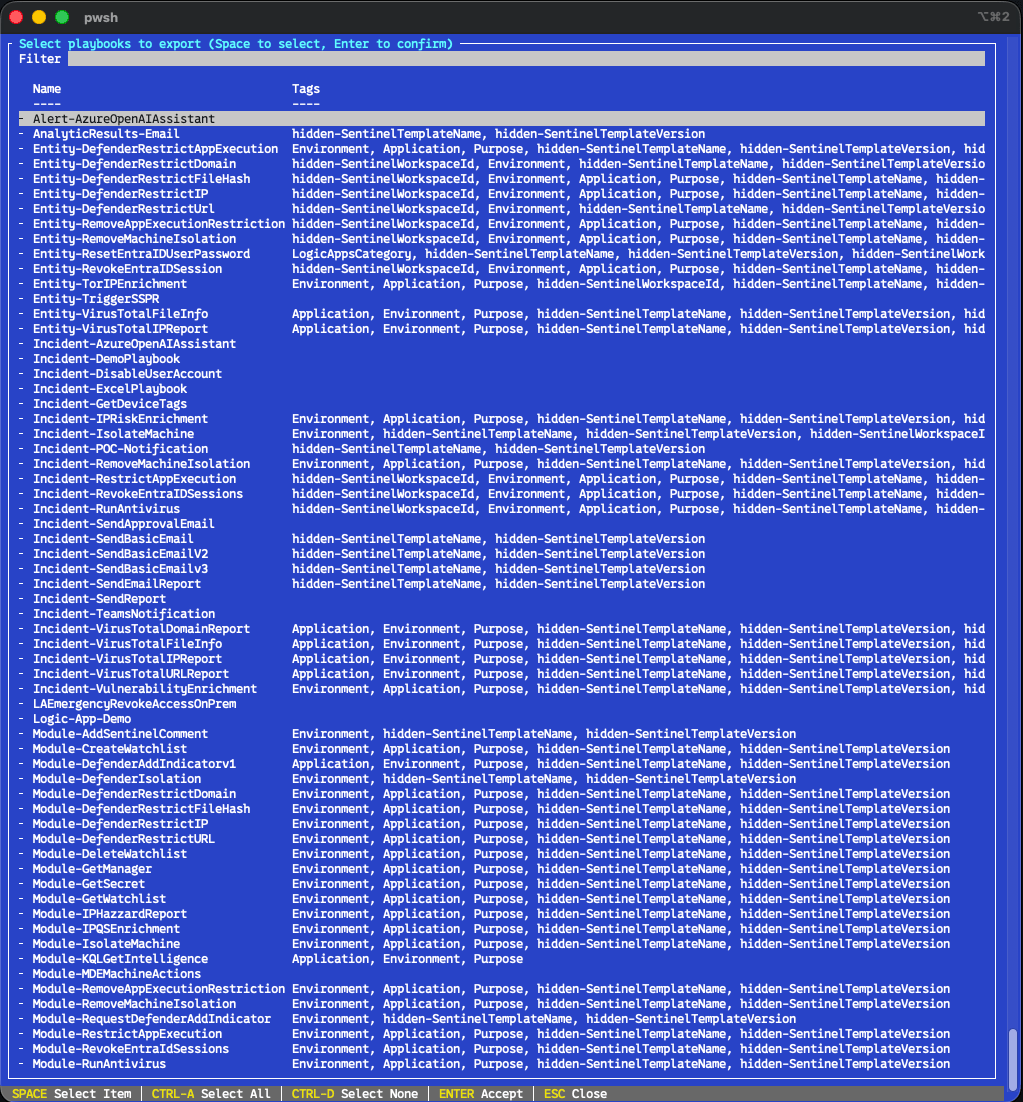
Out-ConsoleGridView supports multi-select out of the box. Space toggles a row, Enter confirms the selection, and everything you picked flows through the rest of the export pipeline. Same sanitisation, same parameter file generation, same deploy option — you just get to cherry-pick the playbooks.
This is a conscious step away from Out-GridView and System.Windows.Forms. Both work beautifully on Windows but neither is cross-platform, and the PowerShell team has been quietly pointing people at ConsoleGuiTools as the supported replacement for years. The picker runs identically on macOS, Linux, and Windows terminals, over SSH, inside WSL, inside VS Code's integrated terminal, and inside tmux.
If the module is not installed, the script notices and explains what to do:
  Microsoft.PowerShell.ConsoleGuiTools not found.
  Install with: Install-Module Microsoft.PowerShell.ConsoleGuiTools -Scope CurrentUser
  Falling back to exporting all playbooks.
It does not exit — it falls back to exporting everything the resource group contains, so a missing module never costs you a run. You can also combine -Interactive with the other flags (-OutputPath, -Deploy, -SkipParameterFiles) without restriction; the picker only changes how the playbooks are selected, not what happens afterwards.
Sanitisation for the Long Tail
Every playbook goes through two layers of transformation: a structured object-graph pass that walks the template tree, and a text-level pass that catches the patterns the object pass cannot see. Between them they cover the edge cases that tend to surface once you start moving playbooks in bulk.
What the extra passes catch
Subscription IDs embedded inside URL paths. Not just the quoted literals, but the /subscriptions/<GUID>/... segments that appear inside Logic App action URIs. Rewritten to subscription().subscriptionId.
Tenant IDs in paths as well as quotes. Both forms. Rewritten to subscription().tenantId.
Resource group names in paths. Rewritten to resourceGroup().name.
Hardcoded locations in API paths. /locations/uksouth/managedApis/azuresentinel becomes /locations/', resourceGroup().location, '/managedApis/azuresentinel.
Connector designer suffixes. The portal cheerfully names the second azuresentinel connection azuresentinel-3. The tool strips the suffix and lowercases the connector name consistently, so MicrosoftSentinel-2, Azuresentinel, and azuresentinel-3 all collapse to the canonical azuresentinel.
Normalising the sentinel connector name. The managed API identifier that Sentinel actually provisions today is azuresentinel. Some tools and portal exports use the older MicrosoftSentinel alias — this tool normalises everything back to azuresentinel (and Mdcalert back to ascalert), matching the canonical form. Choose either convention and the exports remain consistent.
STIX indicator pattern escaping. Threat intelligence playbooks contain Compose actions with patterns like [ipv4-addr:value = '1.2.3.4']. Because ARM sees the leading bracket as a template expression, these need [[ at the front. The tool regex-fixes every variant — ipv4-addr, ipv6-addr, domain-name, url, file, email-addr, network-traffic, windows-registry-key, process, software, user-account, mac-addr, autonomous-system, directory.
encodeURIComponent expression escaping. encodeURIComponent('@parameters('foo')') gets rewritten to the ARM-correct encodeURIComponent(parameters('foo')).
Semicolon-delimited ARM expressions. Hard to get right by hand, easy to break on export. Regex-fixed.
80-character connection name limits. Azure rejects Microsoft.Web/connections resources with names longer than 80 characters. The tool truncates the connector prefix when the combined <prefix>-<playbook> would overflow.
Connection handling
When a playbook references the same managed API through two different connector instances, the Azure export naturally emits duplicate Microsoft.Web/connections resources. The tool deduplicates these, deduplicates the matching $connections workflow parameter entries, and rewrites every reference to point at the surviving copy.
Managed identity authentication is applied only where it is actually supported. The set of managed APIs that accept MSI is small — azuresentinel and keyvault are the main ones — and flipping unsupported APIs to parameterValueType: Alternative causes the deployment to fail. The tool maintains an allow-list and only adds MI configuration to APIs that can use it. For APIs that cannot, it strips connectionProperties and provisioningState so the ARM engine deploys cleanly.
When MI is configured, the user-assigned managed identity path itself is parameterised:
"identity": "[concat('/subscriptions/', parameters('SubscriptionId'), '/resourceGroups/', parameters('ResourceGroupName'), '/providers/Microsoft.ManagedIdentity/userAssignedIdentities/', parameters('ManagedIdentityName'))]"
Three parameters auto-generated, with sensible defaults ([subscription().subscriptionId], [resourceGroup().name], and a required ManagedIdentityName).
Every playbook gets a proper dependsOn block that references all of its connection resources, so ARM deploys them in the correct order.
Parameter Files for the Pipeline
The biggest addition over the interactive workflow is parameter file generation. For a SOC engineer sharing a playbook over email, a single azuredeploy.json is exactly what you want — fewer files, fewer moving parts. For a pipeline, you need more.
Every export produces three things per playbook:
OutputPath/
├── environment.parameters.json           # Master config — fill in once for your environment
├── Incident-EntityEnrichment/
│   ├── azuredeploy.json                  # Sanitised ARM template
│   └── azuredeploy.parameters.json       # Per-playbook parameter file
├── Incident-AutoTriage/
│   ├── azuredeploy.json
│   └── azuredeploy.parameters.json
└── ...
Per-playbook azuredeploy.parameters.json files drop straight into an Azure DevOps AzureResourceManagerTemplateDeployment@3 task. The environment.parameters.json at the root aggregates every unique parameter across every playbook in the export — one place to fill in the values that vary between your dev, test, and production environments, with self-describing _readme comments inline.
{
  "_readme": "Fill in the values below for your target environment.",
  "ManagedIdentityName": "mi-soar-playbooks-prd",
  "_ManagedIdentityName": "Value for ManagedIdentityName.",
  "NotificationEmailAddress": "soc@company.com",
  "_NotificationEmailAddress": "Value for NotificationEmailAddress.",
  "TagBusinessUnit": "Security",
  "TagCostCentre": "SOC-OPS-001"
}
Parameters that resolve automatically at deploy time (SubscriptionId defaulted to [subscription().subscriptionId], ResourceGroupName defaulted to [resourceGroup().name], TenantId) are omitted from the environment file. You only fill in values the deployment cannot work out on its own.
If you are publishing to a gallery or a repo where parameters are generated separately at deploy time, -SkipParameterFiles drops the parameter outputs and gives you just the templates.
Workflow-Level Parameter Auto-Wiring
Playbooks commonly reference values that need to flow through three levels: ARM template → Logic App workflow parameters → workflow definition. Things like NotificationEmailAddress, SenderEmailAddress, TeamsChannelId, SensitivityLabelId, KeyVaultSecretName, and ClientId. Getting the passthrough right by hand is fiddly and easy to break.
The tool scans every Logic App definition for @parameters('foo') references, cross-references them against a known list of workflow-level parameters, and wires up the plumbing automatically. At the ARM level, as a workflow parameter, and as a definition parameter. Three places, one scan.
Metadata and Tags
Every exported template gets a populated metadata block:
- Title — the playbook name.
- Description — auto-generated, including the detected trigger type (Incident, Alert, Scheduled, Entity, Manual) and the list of connectors the playbook uses.
- Prerequisites — an active Sentinel subscription, plus a note about any custom API connectors or user-assigned managed identities the playbook needs.
- postDeployment — a reminder to configure API connections and assign managed identity roles.
- lastUpdateTime — ISO-8601 timestamp of the export.
- Entities — detected from action paths. Incident enrichment playbooks that touch
/entities/ip,/entities/account,/entities/url, and so on get a proper entities array populated automatically. Nine entity types covered today. - Tags — the list of connectors, lowercased.
- Support — set to
communitywith anarmtemplatefield identifying the generator.
Hidden Sentinel template tags (hidden-SentinelTemplateName, hidden-SentinelTemplateVersion) are preserved and rewritten correctly — the portal uses these for template recognition, and getting them wrong causes duplicates in the gallery.
Governance tags — Cost Centre, Owner, CostOwner, ServiceOwner, ServiceName, BusinessUnit, Department — are parameterised. Your source environment's specific values never leak into the template, and each parameter gets a proper description for the deploying engineer.
Deploy in the Same Command
-Deploy flips the script from export-only to full round-trip:
./Invoke-SentinelPlaybookManager.ps1 -ResourceGroupName 'rg-source' `
    -Deploy -TargetResourceGroupName 'rg-target' `
    -EnvironmentFile './my-env.json'
Export from source. Sanitise. Read environment.parameters.json (either the provided one or the auto-generated one). Walk every exported playbook directory. For each, merge environment values with template defaults, write a per-playbook parameter file, and fire New-AzResourceGroupDeployment against the target resource group with a timestamped deployment name. Collect the results. Print a summary table.
One failure does not kill the whole run — each deployment is wrapped in its own try/catch, and you get a list of which playbooks succeeded and which did not at the end.
That is the entire "export from dev, deploy to test" workflow in a single command.
Pick the Right Tool for the Job
The two tools are built for different workflows. Both have their place.
| Use case | Playbook ARM Template Generator | Invoke-SentinelPlaybookManager |
|---|---|---|
| Share a single playbook with a colleague | Great fit | Overkill |
| Publish to the community gallery | Great fit — -GenerateForGallery is exactly this | Works, use -SkipParameterFiles |
| Bulk export via interactive multi-select | Yes — Out-GridView with Ctrl/Shift | Yes — ConsoleGuiTools, cross-platform |
| Bulk export via wildcard / name filter | Not available | Yes — -PlaybookFilter 'Incident-*' |
| Run unattended (no prompts for tenant, subscription, playbook) | Interactive prompts block it | Parameter-driven, headless |
| Run inside Azure DevOps / GitHub Actions | Needs human at the picker | Fully scriptable |
| Run on macOS / Linux | DLL workaround required for Windows Forms | Native PowerShell 7 |
Per-playbook azuredeploy.parameters.json | Out of scope | Yes |
Aggregated environment.parameters.json | Out of scope | Yes |
| Deploy to a target tenant in the same command | Out of scope | Yes |
| Governance tag parameterisation | Out of scope | Yes |
Detailed edge-case sanitisation (URL-embedded IDs, STIX, encodeURIComponent) | Covers the common cases | Covers the long tail |
If your workflow matches the left column, stick with the original — it is well-crafted for that job and it will continue to be maintained by the Azure-Sentinel team. If your workflow has drifted toward the right column, this rewrite exists to close those gaps.
Where It Fits
Invoke-SentinelPlaybookManager slots naturally into the wider Sentinel-As-Code story. The pipeline in that project expects ARM templates in a specific shape — parameterised, deduplicated, environment-free — and this tool produces exactly that shape. Export from a working environment, commit the output, let the pipeline own the deployment from there on.
Credit Where It Is Due
None of this exists without the original Playbook ARM Template Generator by Sreedhar Ande and Itai Yankelevsky. The core idea — that sanitising a Logic App export is a solvable problem worth solving — is entirely theirs. The patterns for identifying managed APIs, handling the $connections block, and emitting clean gallery metadata all started with their work, and a substantial amount of the thinking in the rewrite is pattern-matching on decisions they made years ago.
Sreedhar in particular has been quietly shaping the community Sentinel tooling story for a long time, and anyone who has ever published a playbook to the gallery owes him a drink. This rewrite is an adaptation of a brilliant tool for a slightly different workflow — not a replacement. Huge thanks to both authors for making it a solved problem in the first place.
If you've found this useful, consider subscribing for more Sentinel, KQL, and detection engineering and CI/CD content.