Sentinel-As-Code: The 2026 Update

Deploy Your Entire Sentinel Environment from a Single Repo
When I first pushed Sentinel-As-Code to GitHub in March 2025 with the subsiquent blog, it was a straightforward Bicep deployment tool — a couple of templates to stand up a Log Analytics workspace and onboard Sentinel. Useful, but limited. It sat largely untouched for a year.
That changes today. Sentinel-As-Code has been rebuilt from the ground up into a complete end-to-end CI/CD solution for Microsoft Sentinel and Defender XDR. Starting from an empty Azure subscription, a single pipeline run now provisions all your infrastructure, deploys Content Hub solutions, deploys seven types of custom content, and pushes custom detection rules to Defender XDR — all version-controlled, all repeatable, all auditable.
Here's everything that's new and what the project looks like in 2026.
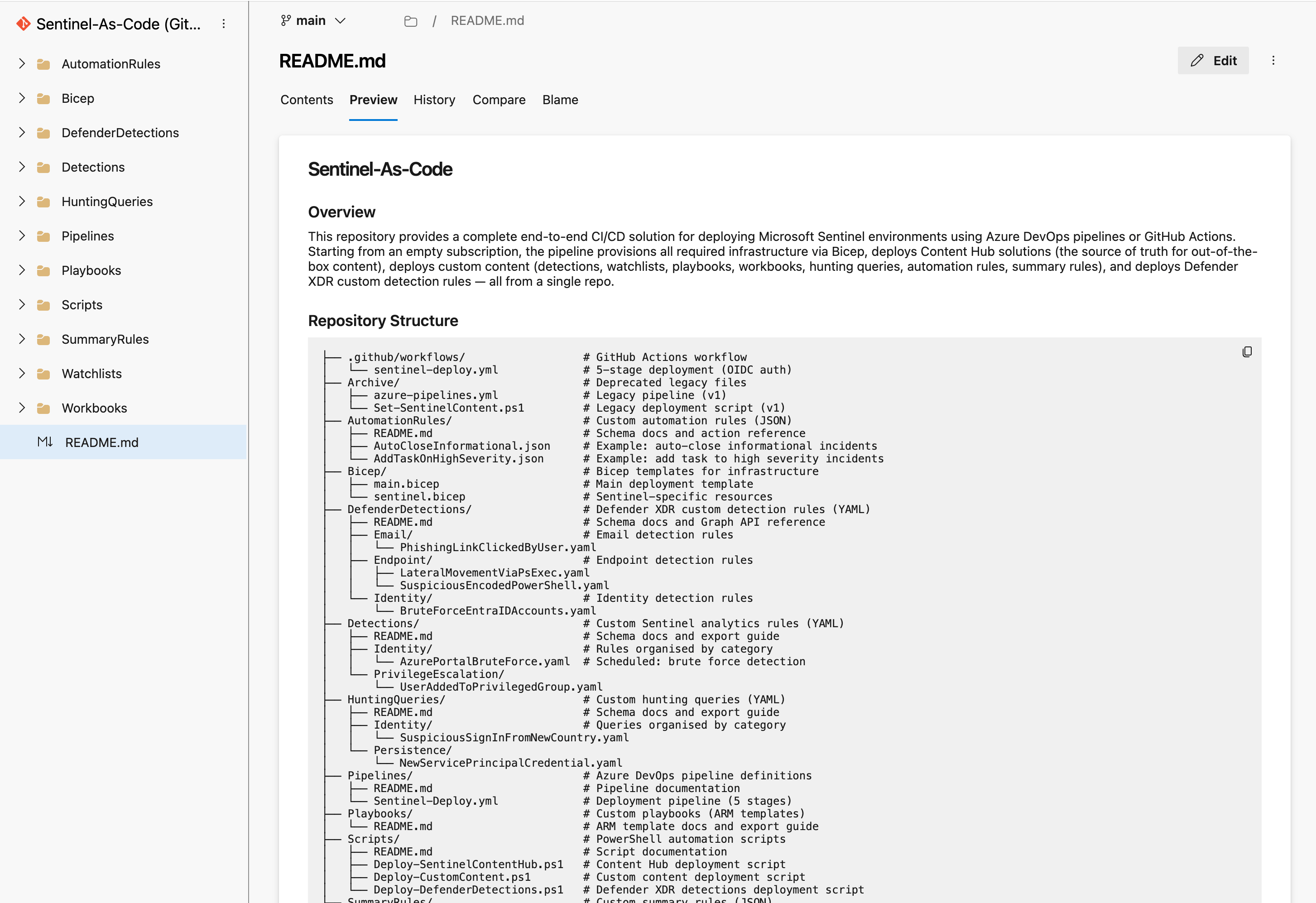
What is Sentinel-As-Code?
Sentinel-As-Code is an open-source repository that lets you manage your entire Microsoft Sentinel deployment through code. Instead of clicking through the Azure portal to configure workspaces, enable UEBA, deploy Content Hub solutions, create analytics rules, and build watchlists — you define everything in files (Bicep, YAML, JSON, ARM templates) and let the pipeline handle deployment.
It supports both Azure DevOps Pipelines and GitHub Actions with full feature parity.
GitHub: github.com/noodlemctwoodle/Sentinel-As-Code
The Five-Stage Pipeline
The pipeline follows a deliberate stage progression. Each stage can be toggled on or off independently, and every stage supports dry run mode so you can preview changes before applying them.
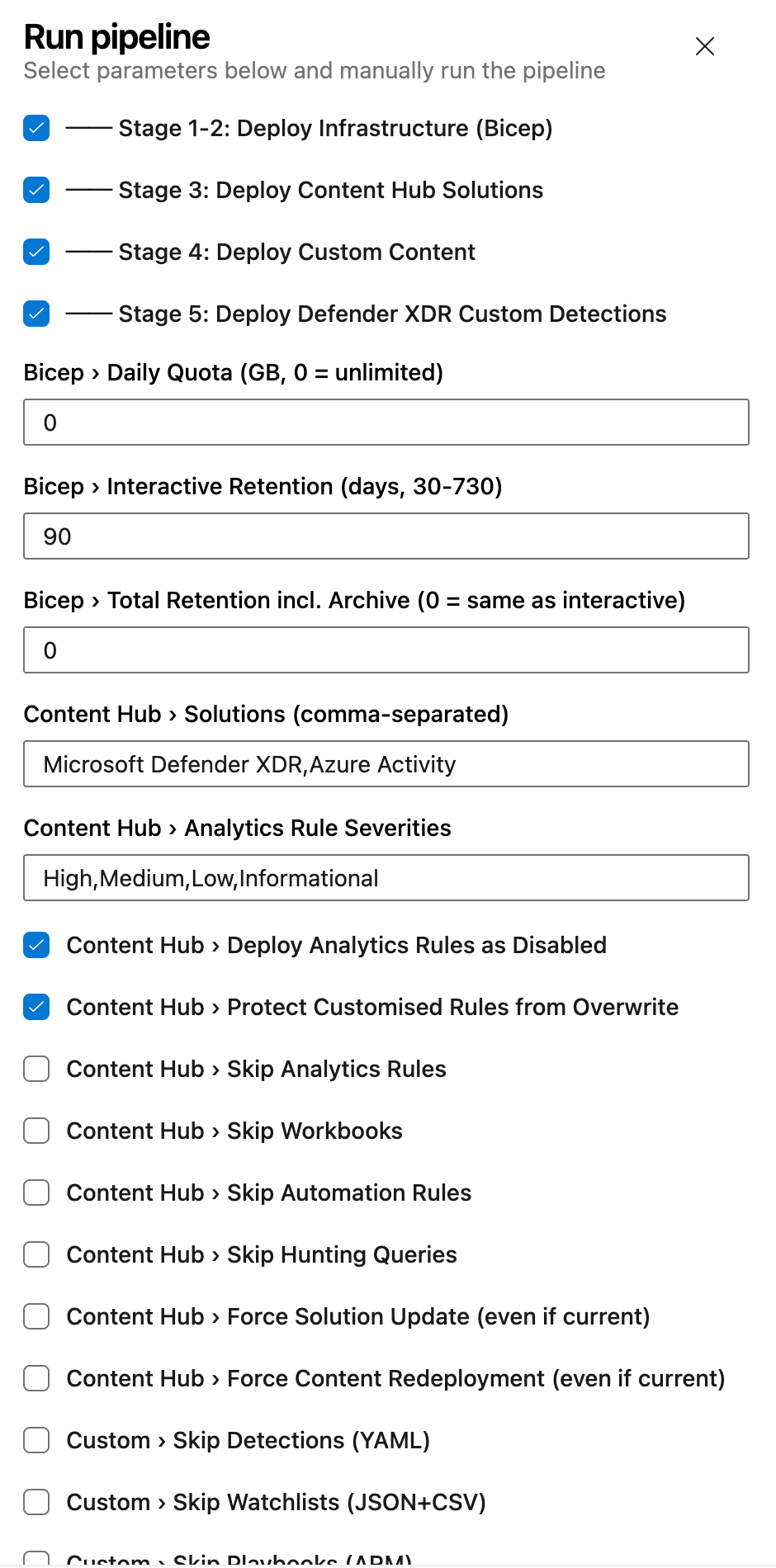
Stage 1 — Check Existing Infrastructure
Before deploying anything, the pipeline queries Azure to determine whether your resource group and Log Analytics workspace already exist. This means the same pipeline handles both greenfield deployments (empty subscription) and existing environments without any configuration changes.
Stage 2 — Deploy Infrastructure (Bicep)
If infrastructure doesn't exist, the pipeline provisions everything via Bicep templates:
- Resource Group with configurable tags
- Log Analytics Workspace with configurable retention (30–730 days), archive tier support, and daily ingestion quotas
- Microsoft Sentinel onboarding
- Entity Analytics with Entra ID provider
- UEBA across AuditLogs, AzureActivity, SigninLogs, and SecurityEvent
- Anomalies (built-in ML detection)
- EyesOn (SOC incident review)
- Diagnostic Settings for both workspace audit logs and Sentinel Health tables
If the workspace already exists, Stage 2 is skipped entirely.
Stage 3 — Deploy Content Hub Solutions
Content Hub is the source of truth for out-of-the-box content. The pipeline deploys solutions and their packaged content — analytics rules, workbooks, automation rules, and hunting queries — via the Azure REST API.
Notable features at this stage:
- Semantic version comparison — only updates solutions when a newer version is available
- Customisation protection — detects analytics rules that have been manually modified in the portal and skips them, preserving your tuning
- Disabled rule deployment — deploy analytics rules in a disabled state so your SOC can review before enabling
- Severity filtering — choose which severities to deploy (High, Medium, Low, Informational)
The script has been tested against 17 Content Hub solutions including Microsoft Defender XDR, Entra ID, Azure Activity, Threat Intelligence, and Windows Security Events.
Stage 4 — Deploy Custom Content
This is the biggest addition in the 2026 update. Stage 4 deploys seven custom content types from the repository, all authored in human-readable formats:
1. Analytics Rules (YAML) Author detection rules in YAML — the same format used by the Azure-Sentinel GitHub repository. The script converts YAML to REST API JSON at deploy time. Supports both Scheduled and NRT rule kinds with full entity mappings, tactics, and techniques.
2. Hunting Queries (YAML) Proactive threat hunting queries deployed as saved searches. Define your KQL, map MITRE tactics and techniques, and the pipeline handles the REST API deployment. Hunting queries appear in the Sentinel Hunting blade ready for your threat hunters.
3. Watchlists (JSON + CSV) Each watchlist is a folder containing a metadata JSON file and a CSV data file. The pipeline uploads the CSV content inline via the REST API. Perfect for maintaining high-value asset lists, IP allowlists, or any enrichment data your detections reference.
4. Playbooks (ARM Templates) Logic App playbooks deployed via ARM template deployments. Drop your azuredeploy.json (and optional parameters file) into a folder and the pipeline handles New-AzResourceGroupDeployment. WhatIf mode uses Test-AzResourceGroupDeployment for safe previewing.
5. Workbooks (Gallery JSON) Export workbooks from the Sentinel portal as gallery templates and store them in the repo. Optional metadata files provide stable GUIDs for idempotent redeployment — no duplicate workbooks on repeated runs.
6. Automation Rules (JSON) Define incident and alert automation in JSON. The schema supports all trigger types (incident created, incident updated, alert created) and all action types (modify properties, run playbook, add incident task). Auto-close informational incidents, add investigation tasks to high-severity incidents, or trigger playbooks — all from code.
7. Summary Rules (JSON) Aggregate verbose log data into cost-effective custom summary tables via the Log Analytics API. Define your KQL aggregation query, choose a bin size (20 minutes to 24 hours), and specify a destination table. Summary rules can significantly reduce costs on high-volume tables while retaining the analytical value.
Every content type can be independently toggled via pipeline parameters, and every deployment supports dry run mode.
Stage 5 — Deploy Defender XDR Custom Detections
The final stage extends beyond Sentinel into Microsoft Defender XDR. Custom detection rules are authored as YAML files organised by category (Email, Endpoint, Identity) and deployed via the Microsoft Graph Security API.
The script supports:
- Upsert logic — creates new rules or updates existing ones matched by display name
- All response action types — isolate device, force password reset, soft-delete email, block file, and more
- OData pagination — handles large rule sets when fetching existing rules
- Separate authentication — acquires a Graph token independently from the ARM token used in earlier stages

Repository Structure
Everything lives in clearly organised top-level folders:
├── .github/workflows/          # GitHub Actions workflow
├── AutomationRules/            # Custom automation rules (JSON)
├── Bicep/                      # Infrastructure templates
├── DefenderDetections/         # Defender XDR custom detections (YAML)
├── Detections/                 # Custom analytics rules (YAML)
├── HuntingQueries/             # Custom hunting queries (YAML)
├── Pipelines/                  # Azure DevOps pipeline
├── Playbooks/                  # Custom playbooks (ARM templates)
├── Scripts/                    # PowerShell deployment scripts
├── SummaryRules/               # Custom summary rules (JSON)
├── Watchlists/                 # Custom watchlists (JSON + CSV)
└── Workbooks/                  # Custom workbooks (gallery JSON)
Each content folder includes a README documenting the expected schema, required fields, and how to export existing content from the Sentinel portal into the correct format.
Example Content Included
The repository ships with working examples for every content type so you can see the expected format and start deploying immediately:
- Detections: Azure portal brute force detection (Scheduled), user added to privileged group (NRT)
- Hunting Queries: Suspicious sign-in from new country, new service principal credential added
- Watchlists: High-value assets with hostname, IP, owner, and criticality
- Playbooks: Incident enrichment Logic App with managed identity
- Workbooks: Security overview dashboard
- Automation Rules: Auto-close informational incidents, add investigation task on high severity
- Summary Rules: Sign-in summary by country (hourly), security alert summary (hourly)
- Defender Detections: Phishing link clicked, lateral movement via PsExec, suspicious encoded PowerShell, brute force against Entra ID
RBAC Requirements
The pipeline needs a service principal with Contributor at subscription scope. That single role covers resource group creation, workspace management, Sentinel content deployment, and summary rule deployment.
Two additional permissions are needed for optional features:
| Role | Scope | Purpose |
|---|---|---|
| Contributor | Subscription | All infrastructure and content deployment |
| Security Administrator (Entra ID) | Tenant | UEBA and Entity Analytics (optional) |
| CustomDetection.ReadWrite.All (Graph) | Tenant | Defender XDR custom detections (Stage 5) |
For organisations that require tighter RBAC, the Pipelines README documents a least-privilege alternative using granular roles (Microsoft Sentinel Contributor, Log Analytics Contributor) scoped to the resource group level.
Azure Government Support
Every script supports the -IsGov switch for Azure Government cloud deployments, targeting the appropriate management and Graph API endpoints.
Getting Started
- Fork or import the repository
- Configure your service connection (Azure DevOps) or OIDC federated credentials (GitHub Actions)
- Set your variables — resource group name, workspace name, region, subscription ID
- Run the pipeline
That's it. The pipeline checks for existing infrastructure, provisions what's missing, and deploys all content. Use whatIf: true on the first run to preview everything before committing.
What's Next
The repository is actively maintained albeit yearly and contributions are welcome. If you're managing Sentinel environments manually, give Sentinel-As-Code a try — the goal is to make your Sentinel deployment as repeatable and auditable as the rest of your infrastructure.
GitHub: github.com/noodlemctwoodle/Sentinel-As-Code
If you've found this useful, consider subscribing for more Sentinel, KQL, and detection engineering content.