ConsentFix: Securing Your Tenant Against OAuth Authorisation Code Theft

There's a new OAuth attack making the rounds that's caught the attention of security professionals. ConsentFix (sometimes called AuthCodeFix) exploits a design quirk in how Microsoft first-party applications handle OAuth flows, and it's very effective. There is a straightforward mitigation that takes about five minutes to implement using PowerShell.
This analysis builds upon excellent technical research by Glueckkanja, Fabian Bader, Christopher Brumm, Thomas Naunheim who first detailed the ConsentFix attack mechanism and mitigation strategies.
ConsentFix represents an evolution in social engineering that builds upon tactics seen in the broader ClickFix campaign. Where ClickFix tricks users into running malicious PowerShell commands by copying and pasting from fake CAPTCHA pages, ConsentFix applies similar deception techniques specifically to OAuth flows to steal authorisation codes. Both attacks share a common weakness: they rely entirely on users performing actions that security tools can't easily distinguish from legitimate activity.
The Social Engineering Evolution: From ClickFix to ConsentFix
Before diving into ConsentFix specifically, it's important to understand the broader threat landscape. Microsoft Threat Intelligence has been tracking what they call the "ClickFix" social engineering technique since mid-2024, with campaigns targeting thousands of devices globally every day.
ClickFix attacks typically work by presenting users with fake CAPTCHA verification screens or error messages that trick them into copying and pasting malicious code into Windows Run dialog boxes or PowerShell terminals. The technique is frighteningly effective because it appears legitimate—users see what looks like a Cloudflare Turnstile check or a reCAPTCHA challenge, and when they "verify" themselves, malicious code is silently copied to their clipboard with instructions on how to "fix" the supposed problem.
Microsoft's research shows that ClickFix campaigns have delivered numerous malware families including Lumma Stealer, DarkGate, AsyncRAT, and even ransomware. The technique has been adopted by both financially motivated cybercriminals and nation-state actors because it's so effective at bypassing automated security controls.
ConsentFix employs the same social engineering tactics as ClickFix but targets a different attack surface. Instead of tricking users into running arbitrary PowerShell commands, ConsentFix specifically targets OAuth authentication flows to steal authorisation codes. The social engineering component is identical—fake verification screens, plausible error messages, and instructions that seem helpful—but the technical objective is OAuth-specific.
ConsentFix is an OAuth attack that abuses legitimate Microsoft authentication mechanisms to steal authorisation codes. Here's what makes it particularly concerning: the entire authentication flow is completely legitimate from Microsoft's perspective. Users see a real Microsoft login page, they authenticate successfully, and yet an attacker can still gain access to their Azure resources.
The attack works because certain Microsoft first-party applications—Azure CLI, Azure PowerShell, Visual Studio, and others—are pre-consented in every Entra ID tenant. This means any user can authenticate to these applications without needing administrator approval. When an attacker tricks a user into starting an OAuth flow with one of these apps, the authentication succeeds, but because the attacker initiated the flow, there's no actual application listening for the response.
The browser redirects to localhost and displays an error, but crucially, the authorisation code is visible in the URL bar. Through social engineering—perhaps asking the user to "copy the URL to help troubleshoot the issue"—the attacker obtains this code and exchanges it for valid access tokens.
Why This Matters for Your Security Posture
This attack has several characteristics that make it particularly problematic:
It works against any user in your tenant, regardless of whether they've ever used Azure CLI or PowerShell. The service principals for these applications don't need to exist beforehand—the attacker's OAuth flow will create them automatically.
The attack exploits the OAuth authorisation code flow in a way that circumvents Conditional Access policies. Whilst the user's initial authentication is protected by Multi-Factor Authentication and Conditional Access, when the attacker redeems the stolen authorisation code from their own infrastructure, these policies are not re-evaluated. This allows the attacker to obtain tokens from a non-compliant device or untrusted location that would normally be blocked.
Stolen tokens can provide access to Azure Resource Manager, Microsoft Graph, and other services depending on the application used in the attack.
Refresh tokens can remain valid for extended periods, weeks or even months. This gives attackers a persistent foothold in your environment.
Because this leverages legitimate OAuth flows, it's difficult to distinguish from normal administrative activity using standard security tools.
The Technical Details
Understanding how this attack works helps appreciate why the mitigation is effective. Microsoft first-party applications have a special status in Entra ID—they're pre-consented, meaning users don't see a consent prompt when authenticating to them. This is by design: Microsoft wants Azure CLI, PowerShell, and Visual Studio to work seamlessly without requiring administrator intervention for every user.
However, this design creates an opportunity for attackers. When you initiate an OAuth flow with Azure CLI, the application expects to receive the authorisation code at http://localhost:8400 (or similar). If an attacker starts this flow but there's no application actually listening, the browser shows an error with the auth code visible in the URL.
The social engineering component is what makes this an effective attack. An attacker might send an email claiming to be from IT support, asking users to "test their Azure access" by clicking a link. The link starts a legitimate OAuth flow. When the error appears, the attacker asks the user to "send me the error URL so I can diagnose the problem." The user complies, thinking they're helping IT support, and the attacker now has everything they need.
Mitigation Strategy
The solution revolves around a fundamental principle in Entra ID: requiring user assignment. When you set AppRoleAssignmentRequired to true on a service principal, only explicitly assigned users can authenticate to that application. This breaks the ConsentFix attack at the first step—random users can no longer consent to these applications, even though they're Microsoft first-party apps.
The clever part is creating these service principals proactively. Normally, a service principal only exists after someone in your tenant has used the application. By creating them before any attacker-initiated OAuth flow, we maintain control over who can authenticate.
Implementation: The Script
I've created a PowerShell script that implements this mitigation with error handling, validation, and verification. The script, Protect-ConsentFix.ps1, provides a unified interface for auditing, protecting, and managing access to vulnerable applications.
Download the complete script from the GitHub repository
Script Features
The script includes five operational modes:
- Audit: Check the current security status of your tenant
- Protect: Implement protection on all vulnerable applications
- GrantAccess: Assign legitimate users to protected applications
- Verify: Test that protection is working correctly
- All: Run complete workflow (audit → protect → verify)
Quick Start
Understanding the Script Output
The script provides clear, colour-coded feedback:
- Green: Protected and secure
- Yellow: Information or warnings
- Red: Vulnerable or errors requiring attention
Step-by-Step Workflow
1. Initial Audit
Before making changes, run an audit to understand your current security posture:
This shows which applications exist in your tenant, whether they're protected, and how many users have access.
2. Apply Protection
Implement the mitigation across all vulnerable applications:
The script will:
- Create service principals for applications that don't exist in your tenant
- Set
AppRoleAssignmentRequiredtotrueon each service principal - Report on successes and any errors encountered
- Wait for Azure replication between operations
3. Grant Access to Legitimate Users
After protection is applied, assign users who genuinely need CLI or PowerShell access:
The script validates both the user and application exist before creating the assignment.
4. Verification
Finally, verify the protection is working correctly:
This checks each application to ensure:
- Service principals exist
- User assignment is required
- Configuration is correct
Alternative: Security Group Management
For organisations with many users requiring CLI access, consider using security groups:
This approach simplifies management—add or remove users from the group rather than managing individual assignments on each application.
What About Existing Deployments?
If these applications are already in use in your environment, deploying this mitigation requires identifying legitimate users. Here's how:
Review this list with your team to determine who genuinely needs access.
Handling Azure Replication Delays
After creating or modifying service principals, Azure needs time to replicate changes across its infrastructure. The script includes built-in delays, but for manual testing:
This ensures you're testing against the current state, not cached data.
Testing the Mitigation
After implementing this protection, it's crucial to verify it's working correctly. Test with a user who hasn't been assigned access:
You should receive an error similar to:
AADSTS50105: The signed in user is not assigned to a role for the applicationThis is exactly what we want—the attack fails at the authentication stage.
Now test with an assigned user:
Important Considerations
Requiring user assignment breaks the ConsentFix attack for unauthorised users, but it's not a complete solution. If an assigned user is successfully phished, the attack still works. Think of this as closing an open door—essential, but not the only security control you need.
Additional Security Layers
Consider implementing these complementary controls:
Create a policy specifically for Microsoft Graph Command Line Tools and Windows Azure Service Management API that requires authentication from trusted locations. This prevents attackers from using stolen refresh tokens from their own infrastructure.
For organisations with Windows 10/11 Entra-joined devices, enable Token Protection. This cryptographically binds tokens to the device, making browser-based authorisation code theft ineffective.
Implement monitoring for unusual OAuth activity, particularly non-interactive sign-ins to CLI tools from unexpected locations or geographical inconsistencies between interactive and non-interactive sign-ins.
Service Principal Replication
After creating or modifying service principals, Azure needs time to replicate changes across its infrastructure. Wait 5-10 minutes before testing, and clear any cached tokens:
Additional Vulnerable Applications
The script covers the most common Microsoft first-party applications, but there are others. EntraScopes maintains a comprehensive list of applications that could be vulnerable. However, be cautious about blocking too many applications—some might be required for legitimate business workflows.
Detection with Microsoft Sentinel
Microsoft Sentinel can provide powerful detection capabilities for ConsentFix attacks. Below are queries to help you both assess your vulnerability and detect active attacks.
Vulnerability Assessment Query
Before implementing detections, it's useful to understand your current attack surface. This query identifies which vulnerable applications exist in your tenant and their current protection status:
What This Query Tells You:
- Activity Analysis: Shows which vulnerable apps are actively used in your environment
- User Count: Identifies how many unique users accessed each application (plan for assignments)
- Sample Users: Provides up to 10 recent users per app for assignment planning
- Priority Recommendations: Helps you prioritize which applications to protect first based on actual usage
Interpreting the Results:
| Scenario | Action Required |
|---|---|
| High sign-in count + many unique users | Implement protection immediately and plan bulk user assignment |
| Low sign-in count + few users | Implement protection and assign specific users |
| No recent activity | Implement proactive protection (no users currently need access) |
Complementary PowerShell Check:
The PowerShell query shows usage patterns, but you need PowerShell to check the actual protection status:
Attack Detection Queries
Once you understand your attack surface, implement these detection queries to identify active ConsentFix attacks:
Primary Detection Query
Whilst prevention is ideal, detection provides a safety net. This query identifies potential ConsentFix activity by looking for geographic anomalies:
This query identifies situations where a user authenticates interactively to a vulnerable application, and then within five minutes, tokens are used from a different geographic location—a strong indicator of ConsentFix or similar OAuth attacks.
Alternative Detection Query: Using SigninLogs Only
If your environment doesn't have AADNonInteractiveUserSignInLogs configured, use this alternative query that relies solely on SigninLogs:
Important Notes:
- The alternative query uses
AuthenticationRequirementto differentiate between interactive and non-interactive sign-ins - Both interactive and non-interactive events must be present in
SigninLogsfor this to work - In some environments, non-interactive sign-ins may only appear in
AADNonInteractiveUserSignInLogs - Test both queries in your environment to determine which provides better coverage
Operational Impact
Before implementing this mitigation, consider the operational implications:
Users who legitimately need CLI tools will require explicit assignment. Communicate this change to your team and establish a clear process for requesting access. Ensure you have a documented process for emergency access. If your automation depends on these applications, verify service accounts are properly assigned.
Track assignment requests to identify patterns. Unusual requests might indicate compromised accounts attempting to gain CLI access.
User Education - The First Line of Defence
Whilst technical controls like requiring user assignment are essential, user education remains your first line of defence against both ClickFix and ConsentFix attacks. Microsoft's research into ClickFix campaigns has shown that these social engineering techniques are effective precisely because they exploit users' natural desire to be helpful and solve problems independently.
Key Warning Signs to Train Users On
Legitimate services rarely require users to copy and paste commands into terminal windows or Run dialog boxes as part of CAPTCHA verification. Any verification process requesting this should be immediately suspect.
If users encounter errors during authentication that display long, complex URLs in the address bar, they should never share these URLs with anyone, even if the request appears to come from IT support.
Social engineering attacks often create artificial urgency. Train users to be sceptical of messages claiming immediate action is required, especially when those actions involve running commands or sharing technical information.
Users should understand that legitimate CAPTCHA systems from Google, Cloudflare, or Microsoft never require:
- Copying text from dialog boxes
- Opening Windows Run dialog (Win+R)
- Pasting commands into PowerShell or Command Prompt
- Downloading and running executables to "verify" they're human
Reporting Procedures
Establish clear procedures for users to report suspicious authentication requests or verification prompts to your security team. In many organisations, users don't report suspicious activity because they're worried about looking foolish or they successfully "fixed" the problem themselves. Create a culture where reporting potential security incidents is celebrated, not discouraged.
The "When in Doubt" Rule
Train users on a simple rule - when authenticating to Microsoft services, if anything asks them to perform an action they don't understand or haven't seen before, stop and contact IT support. The five minutes spent verifying whether something is legitimate is always worth it compared to the potential cost of a security breach.
Conclusion
ConsentFix demonstrates that even well-designed authentication mechanisms can be exploited through social engineering. The attack is elegant in its simplicity—it doesn't exploit a vulnerability in the traditional sense, but rather abuses a legitimate feature in an unexpected way.
The mitigation we've implemented here requiring user assignment for Microsoft first-party applications is straightforward but effective. By pre-creating service principals and enforcing assignment requirements, we prevent the automatic consent that makes ConsentFix possible.
However, this should be viewed as part of a layered security approach. Combine this mitigation with Conditional Access policies, monitoring, and user education for comprehensive protection. Remember that security is a process, not a destination, regular reviews of application assignments and security policies are essential.
Five minutes of configuration could prevent a serious security incident later. The scripts provided here make implementation straightforward, and the modular approach allows you to adapt them to your specific requirements.
References


 AnuPriya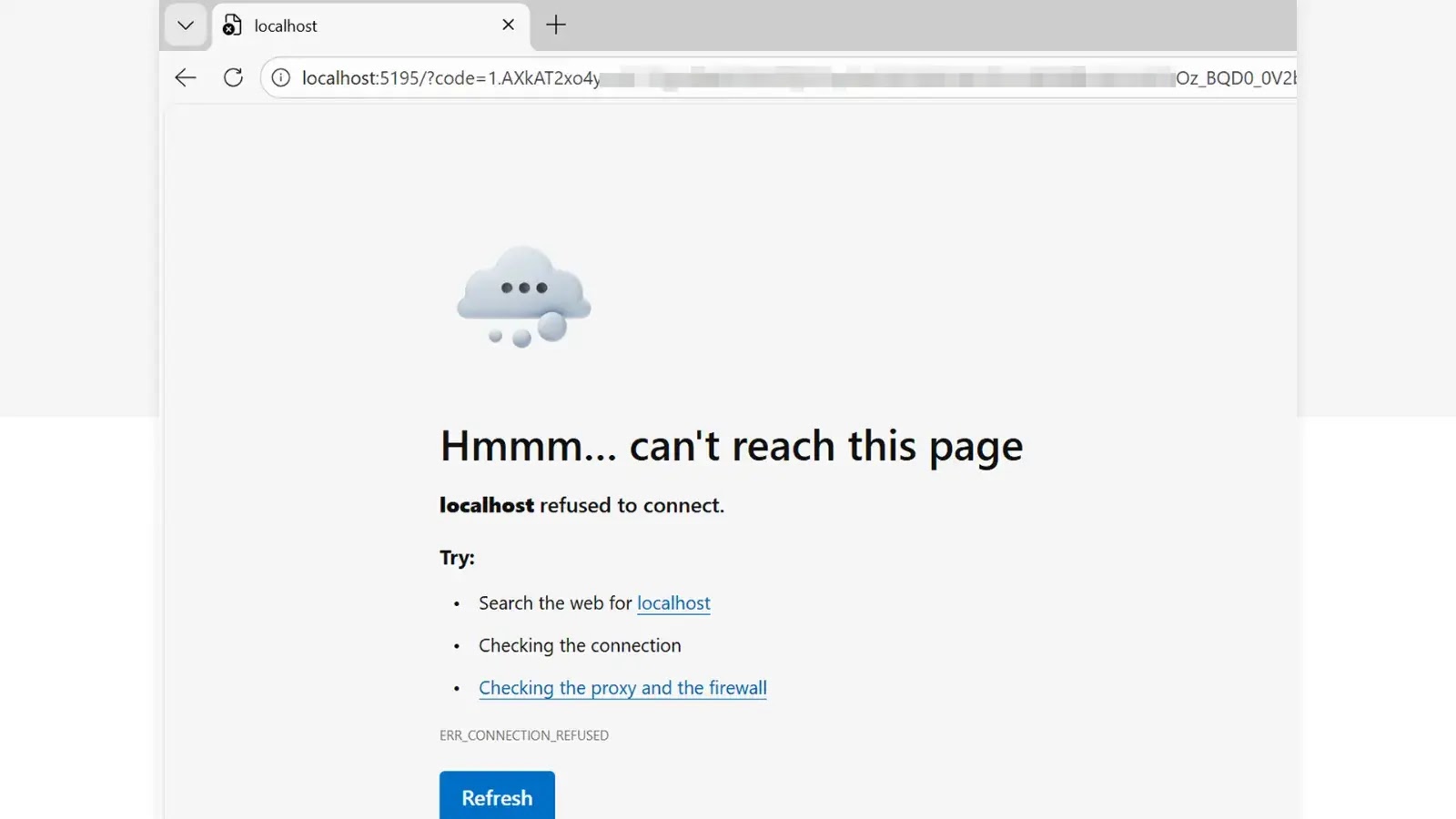

 Microsoft Threat Intelligence, Microsoft Defender Experts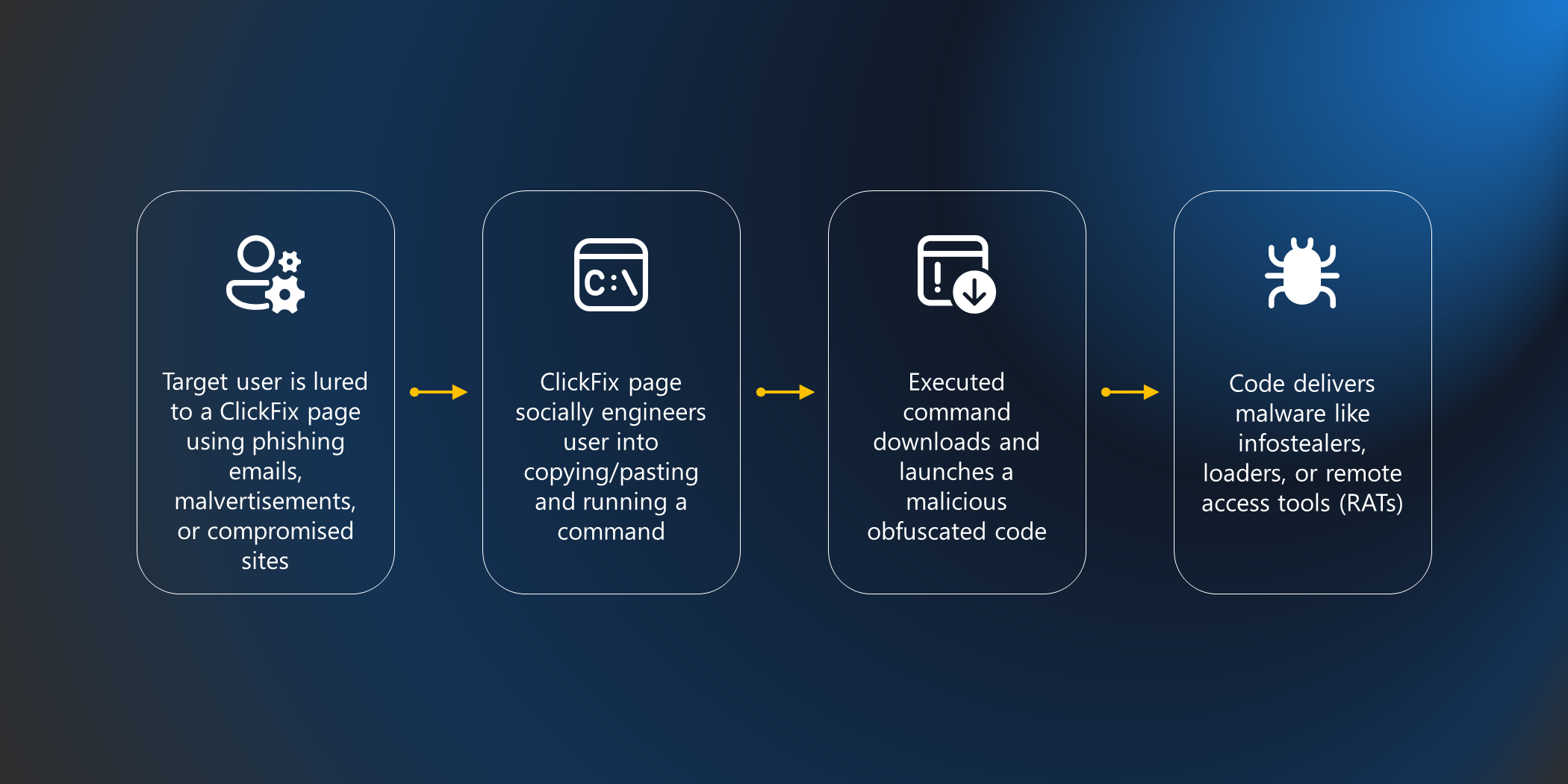
 Jackson-Woods
 MicrosoftGuyJFlo

If you've enjoyed this content and would like to support more like it, please consider joining the Supporters Tier. Your support helps me continue creating practical security automation content for the community.