Becoming the Puppet Master of an AI SOC team

I released a Model Context Protocol server called KQL Search MCP last week. The idea was stop manually searching through GitHub repositories every time I needed a KQL query. It search thousands of queries from all GitHub repos, validates them against table schemas, and can even generate new queries from plain natural language descriptions.
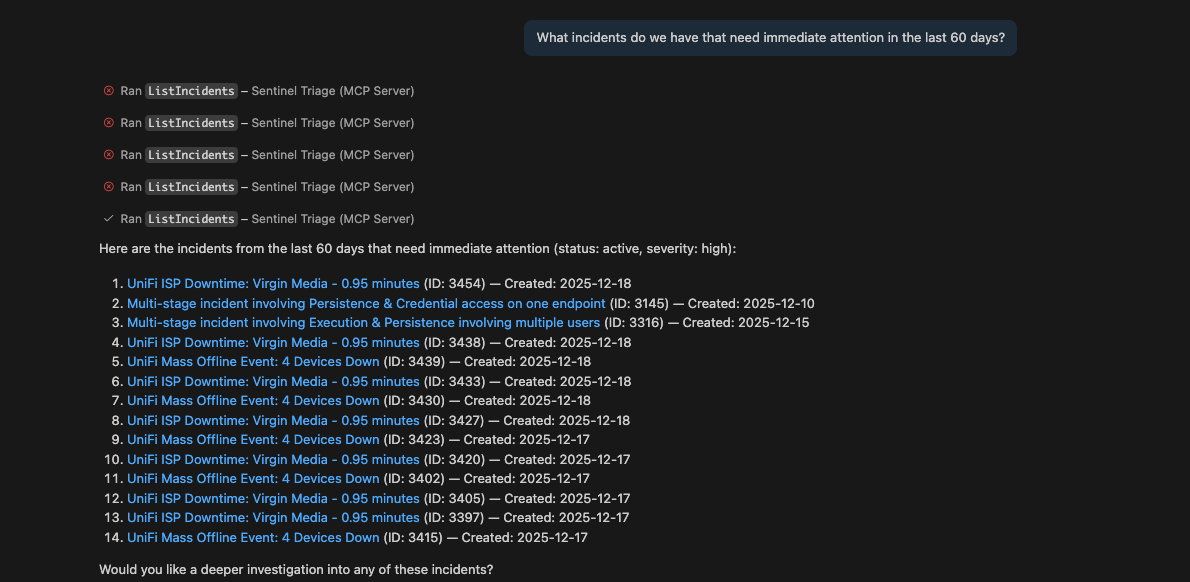
Microsoft has also released the Sentinel MCP server with two collections Data Exploration for connecting to Sentinel data lake and running queries, and Triage for incident management and entity investigation. I had this interesting idea to showcase multiple tools working together, a tool that finds and validates queries, another that executes them against your actual data, and a third that investigates the entities involved.
That's where VS Code's custom agents came in. Could I create AI agents that would orchestrate these tools autonomously? Not just "here's a tool, use it when I tell you," but agents that actually decide which tool to use and when, based on what they're investigating.
I built KQL Search MCP to make certain tasks faster, searching for KQL queries across thousands of GitHub repositories, validating them against table schemas, even generating queries from natural language. It's a potentially useful tool as an analyst, but it could be exponentially more useful to an agent.
Suddenly we had multiple complementary tools: KQL Search MCP for finding and validating queries, Microsoft's Data Exploration for executing them, and Triage collection for investigating users, devices, files, and IPs.
Custom Agents
VS Code has this brilliant feature called custom agents that lets you create specialised AI assistants with access to specific tools.
So theoretically, I could create an AI agent that would search for investigation queries with KQL Search MCP, then execute them against real Sentinel data with Microsoft's MCP, all without me having to lift a finger. The agent could investigate alerts the same way I do, but without me having to remember which tool to call when.
Meet the Team
The AI SOC team is the entry point. You throw an alert at the SOC Analyst, and it immediately starts investigating. After you have applied the permissions to the tools the first time any subsiquent runs will not require prompting again, no "let me suggest some queries." It uses Microsoft's Sentinel Triage MCP to get incident details and investigate entities, then KQL Search MCP to find relevant investigation queries from the community, then executes them against your actual data using either collection. It checks IP addresses on threat intelligence feeds, makes a triage decision, and hands off to whoever needs to handle it next.
The entire workflow is: get incident context using Sentinel Triage → search for proven queries using my KQL Search MCP → execute them against real data using Sentinel MCP → investigate entities with Triage tools → analyse results → hand off. The agents aren't just suggesting what to do – they're actually doing it, using tools that already existed but now work together autonomously.
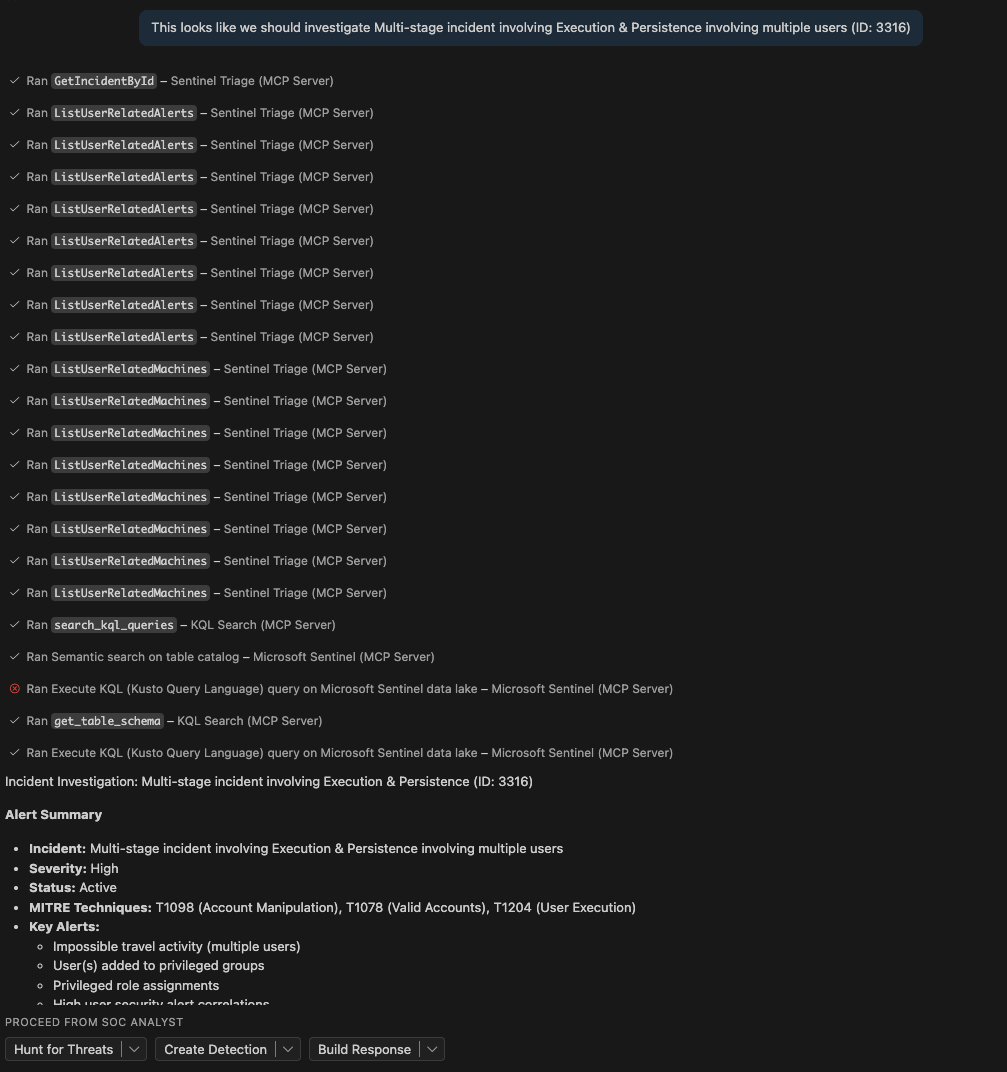
The Threat Hunter is the one for deeper investigation. It hunts for related activity, checks for signs of compromise beyond the initial alert, and validates findings across the environment.
The Detection Engineer handles detection rule creation. It searches for similar detection patterns, maps to MITRE ATT&CK, adds entity extraction, tests against historical data for false positives, and documents the rule properly.
The Incident Responder focuses on containment and recovery. It investigates affected entities, maps lateral movement, checks vulnerabilities, and provides remediation steps based on the incident scope.
Handoffs
Each agent can hand off to the others automatically. The SOC Analyst finishes investigating and decides it needs deeper hunting? It hands off to the Threat Hunter with full context. The Threat Hunter finds a new attack pattern? Hands off to the Detection Engineer to build a rule. The Detection Engineer creates a detection? Hands off to the Incident Responder to write the playbook.
I set all the handoffs to send: true, which means they don't ask for permission – they just do it. Click the "Hunt for Threats" button after the SOC Analyst finishes, and boom, the Threat Hunter is already running with all the context from the investigation.
Reality Check
Does it work perfectly? Of course not. Sometimes the agents get a bit enthusiastic and run queries that return half a million rows. Sometimes they confidently cite a GitHub repository that doesn't exist. Sometimes they hand off to each other in circles like analysts arguing over whose turn it is to investigate the phishing alert.
The agents do the tedious investigation work, I review their findings and make the final decisions, and I get to spend more time on the interesting problems. Like writing about security automation or building more custom agents.
I'm not claiming this revolutionises SOC work or replaces analysts. It's an experiment that happens to be quite useful. The agents do the mechanical bits searching for queries with KQL Search MCP, running them with Microsoft's, fetching threat intel – while I review the work and make the actual decisions. They're not smarter than me (yet, it won't be long though), they're just better at remembering which tool to call next and not getting bored.
The Setup (For Those Who Care)
If you're thinking "I want my own puppet SOC team," here's what you need: VS Code with GitHub Copilot, the KQL Search MCP extension, and Microsoft's Sentinel MCP server. The whole setup takes about an hour if you're new to this, less if you've worked with MCP before.
The agents themselves are just markdown files with YAML headers – all available on my GitHub. Download them, drop them in your workspace, and you're mostly done. The YAML headers specify which tools they can use and who they can hand off to. In the tools list, 'kql-search/*' gives them access to all 32 KQL-Search-MCP tools, 'microsoft-sentinel/*' connects to the Data Exploration collection, and 'sentinel-triage/*' provides the Triage tools.
And critically, you set infer: true in the headers so the agents can call each other, and send: true on the handoffs so they actually do it instead of asking permission. Otherwise you're just building a very elaborate suggestion engine, which defeats the point of this experiment.
The Bottom Line
Is it over-engineered? Probably. Did it take longer to build than it'll ever save me in time? Almost certainly. But it's a genuinely interesting way to use the tools we already have available, and it demonstrates something worth thinking about: we've got these powerful capabilities sitting around, and we're barely scratching the surface of how to orchestrate them effectively.
I'm not claiming this is the future of SOC work. It's just an experiment that worked better than expected. And honestly? Watching AI agents hand off work to each other like a relay team is oddly satisfying, even if I did spend nine hours debugging why they kept trying to hand off to themselves in circles.
And that's a wrap for 2025. Enjoy the holidays, don't check your work emails, and I'll see you next year with more experiments in security automation.

If you've enjoyed this content and would like to support more like it, please consider joining the Supporters Tier. Your support helps me continue creating practical security automation content for the community.